<?xml version="1.0" encoding="utf-8"?>
<feed xmlns="http://www.w3.org/2005/Atom">
    <title>jmcnamara</title>
    <link rel="alternate" type="text/html" href="http://blogs.perl.org/users/john_mcnamara/" />
    <link rel="self" type="application/atom+xml" href="http://blogs.perl.org/users/john_mcnamara/atom.xml" />
    <id>tag:blogs.perl.org,2009-11-03:/users/john_mcnamara//59</id>
    <updated>2012-12-10T20:34:49Z</updated>
    <subtitle>A blog about the Perl programming language</subtitle>
    <generator uri="http://www.sixapart.com/movabletype/">Movable Type Pro 4.38</generator>

<entry>
    <title>Adding Macros to Excel::Writer::XLSX</title>
    <link rel="alternate" type="text/html" href="http://blogs.perl.org/users/john_mcnamara/2012/12/adding-macros-to-excelwriterxlsx.html" />
    <id>tag:blogs.perl.org,2012:/users/john_mcnamara//59.4104</id>

    <published>2012-12-05T23:38:34Z</published>
    <updated>2012-12-10T20:34:49Z</updated>

    <summary>Macros are a powerful feature of Excel and are a frequently requested feature for Spreadsheet::WriteExcel and Excel::Writer::XLSX. It is also a feature that I&apos;ve wanted to add for some time but it wouldn&apos;t be feasible, with current human lifespans, to...</summary>
    <author>
        <name>John McNamara</name>
        <uri>http://search.cpan.org/~jmcnamara/</uri>
    </author>
    
    <category term="excel" label="Excel" scheme="http://www.sixapart.com/ns/types#tag" />
    <category term="excelwriterxlsx" label="Excel::Writer::XLSX" scheme="http://www.sixapart.com/ns/types#tag" />
    <category term="perl" label="perl" scheme="http://www.sixapart.com/ns/types#tag" />
    <category term="spreadsheetwriteexcel" label="Spreadsheet::WriteExcel" scheme="http://www.sixapart.com/ns/types#tag" />
    
    <content type="html" xml:lang="en" xml:base="http://blogs.perl.org/users/john_mcnamara/">
        <![CDATA[<p>Macros are a powerful feature of Excel and are a frequently requested feature for Spreadsheet::WriteExcel and Excel::Writer::XLSX.</p>

<p>It is also a feature that I've wanted to add for some time but it wouldn't be feasible, with current human lifespans, to re-implement Excel's VBA in Perl. So instead I implemented a scheme to "borrow" the VBA code from Excel and add it to an Excel::Writer::XLSX file.</p>

<p>At its simplest an Excel 2007+ file is a collection of XML files in a zip container. Here is a look inside a sample file that contains macros:</p>

<pre><code>$ unzip -qql Book1.xlsm | awk '{print $4}'
[Content_Types].xml
_rels/.rels
xl/_rels/workbook.xml.rels
xl/workbook.xml
xl/drawings/vmlDrawing1.vml
xl/worksheets/_rels/sheet1.xml.rels
xl/theme/theme1.xml
xl/styles.xml
xl/vbaProject.bin
xl/worksheets/sheet1.xml
docProps/core.xml
docProps/app.xml
</code></pre>

<p>In amongst the .xml files you can see there is a <code>vbaProject.bin</code> file. This is an OLE Compound Document file, or rather a collection of files, that contain the VBA macros associated with the Excel workbook.</p>

<p>So, I wrote a <a href="http://search.cpan.org/~jmcnamara/Excel-Writer-XLSX/bin/extract_vba">small Perl application</a> using Archive::Zip to extract the VBA project from an existing Excel file:</p>

<pre><code>$ extract_vba Book1.xlsm
Extracted 'vbaProject.bin' successfully
</code></pre>

<p>Then I added a function to Excel::Writer::XLSX so that it could be added to a new file:</p>

<pre><code>#!/usr/bin/perl

use strict;
use warnings;
use Excel::Writer::XLSX;

my $workbook  = Excel::Writer::XLSX-&gt;new( 'macros.xlsm' );
my $worksheet = $workbook-&gt;add_worksheet();

$workbook-&gt;add_vba_project( './vbaProject.bin' );

# Add the usual Excel::Writer::XLSX code to populate the workbook.
# ...

__END__
</code></pre>

<p>So, now we have a new Excel::Writer::XLSX file that contains macros and all the other data we want to add. This is kind of cool but not very useful. It is possible to use complex functions contained in the VBA but calling the macros is a more manual process.</p>

<p>So the next step was to add some form buttons to link the macros to actions on the worksheet. Unfortunately, form buttons in Excel 2007+ are implemented in VML which is a messy XML format that isn't very well documented and which contains lots of quirky backward compatibility features.</p>

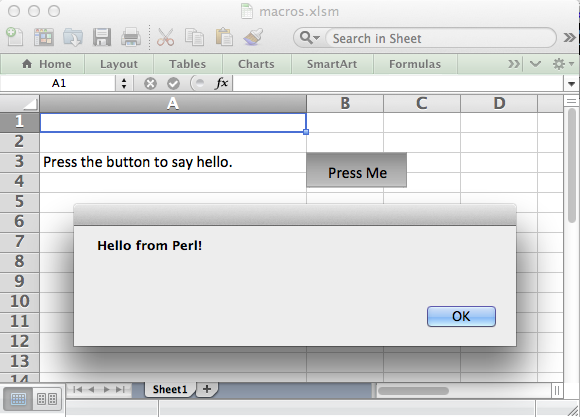
<p>Nevertheless, a few late nights later I added form buttons. The process was too painful to add any other form types but at least I was able to add the most common Excel form element. So now you can do something like this:</p>

<pre><code>#!/usr/bin/perl

use strict;
use warnings;
use Excel::Writer::XLSX;

my $workbook  = Excel::Writer::XLSX-&gt;new( 'macros.xlsm' );
my $worksheet = $workbook-&gt;add_worksheet();

# Widen the column for clarity.
$worksheet-&gt;set_column( 'A:A', 30 );

# Add the VBA project binary.
$workbook-&gt;add_vba_project( './vbaProject.bin' );

# Show text for the end user.
$worksheet-&gt;write( 'A3', 'Press the button to say hello.' );

# Add a button tied to a macro in the VBA project.
$worksheet-&gt;insert_button(
    'B3',
    {
        macro   =&gt; 'say_hello',
        caption =&gt; 'Press Me',
        width   =&gt; 80,
        height  =&gt; 30
    }
);

__END__
</code></pre>

<p>And when you run it you get something like this:</p>

<p><img alt="macros.png" src="http://blogs.perl.org/users/john_mcnamara/Screen%20Shot%202012-12-05%20at%2023.33.45.png" width="580" height="417" class="mt-image-center" style="text-align: center; display: block; margin: 0 auto 20px;" /></p>

<p>This is now available in version 0.60 of <a href="http://search.cpan.org/~jmcnamara/Excel-Writer-XLSX/">Excel::Writer::XLSX</a> on CPAN and as it says in the release notes: The portal to the dungeon dimensions is now fully open.</p>
]]>
        

    </content>
</entry>

<entry>
    <title>Sparklines in Excel::Writer::XLSX</title>
    <link rel="alternate" type="text/html" href="http://blogs.perl.org/users/john_mcnamara/2012/11/sparklines-in-excelwriterxlsx.html" />
    <id>tag:blogs.perl.org,2012:/users/john_mcnamara//59.4036</id>

    <published>2012-11-11T19:33:25Z</published>
    <updated>2012-11-11T23:02:34Z</updated>

    <summary>I&apos;ve added Sparklines to the latest version Excel::Writer::XLSX. Sparklines are small charts showing trends that fit in a single cell. They were invented (or at least named) by Edward Tufte. In Excel they look something like this: Excel::Writer::XLSX now provides...</summary>
    <author>
        <name>John McNamara</name>
        <uri>http://search.cpan.org/~jmcnamara/</uri>
    </author>
    
    <category term="excel" label="Excel" scheme="http://www.sixapart.com/ns/types#tag" />
    <category term="excelwriterxlsx" label="Excel::Writer::XLSX" scheme="http://www.sixapart.com/ns/types#tag" />
    <category term="spreadsheetwriteexcel" label="Spreadsheet::WriteExcel" scheme="http://www.sixapart.com/ns/types#tag" />
    
    <content type="html" xml:lang="en" xml:base="http://blogs.perl.org/users/john_mcnamara/">
        <![CDATA[<p>I've added Sparklines to the latest version <a href="http://search.cpan.org/~jmcnamara/Excel-Writer-XLSX/lib/Excel/Writer/XLSX.pm">Excel::Writer::XLSX</a>.</p>

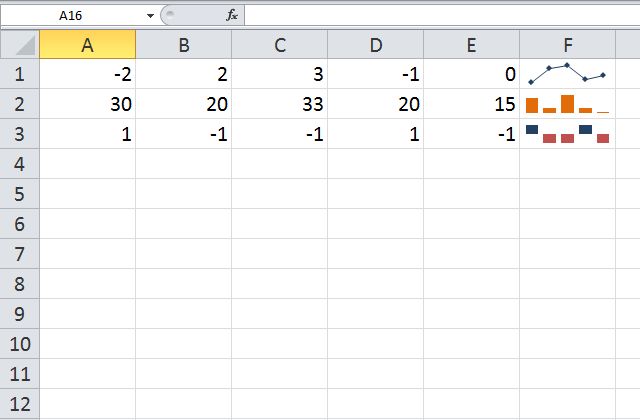
<p><a href="http://en.wikipedia.org/wiki/Sparklines">Sparklines</a> are small charts showing trends that fit in a single cell. They were invented (or at least named) by <a href="http://en.wikipedia.org/wiki/Edward_Tufte">Edward Tufte</a>.</p>

<p>In Excel they look something like this:</p>

<p><img alt="sparklines1.jpg" src="http://blogs.perl.org/users/john_mcnamara/sparklines1.jpg" width="640" height="420" class="mt-image-center" style="text-align: center; display: block; margin: 0 auto 20px;" /></p>

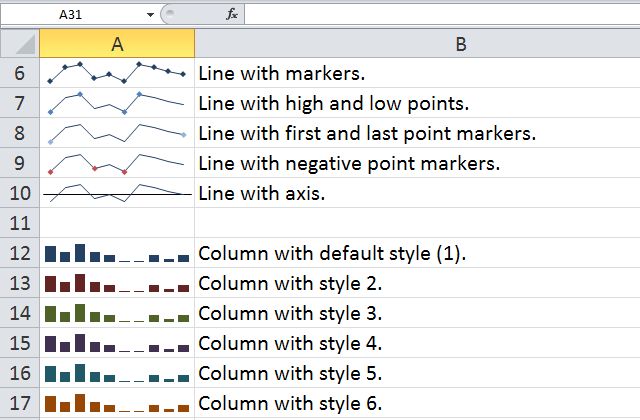
<p>Excel::Writer::XLSX now provides an interface to Sparklines in Excel and to all of their options to allow worksheets like the following (taken from the output of one of the <a href="http://search.cpan.org/~jmcnamara/Excel-Writer-XLSX/lib/Excel/Writer/XLSX/Examples.pm#Example:_sparklines2.pl">example programs</a>):</p>

<p><img alt="sparklines2.jpg" src="http://blogs.perl.org/users/john_mcnamara/sparklines2.jpg" width="640" height="420" class="mt-image-center" style="text-align: center; display: block; margin: 0 auto 20px;" /></p>

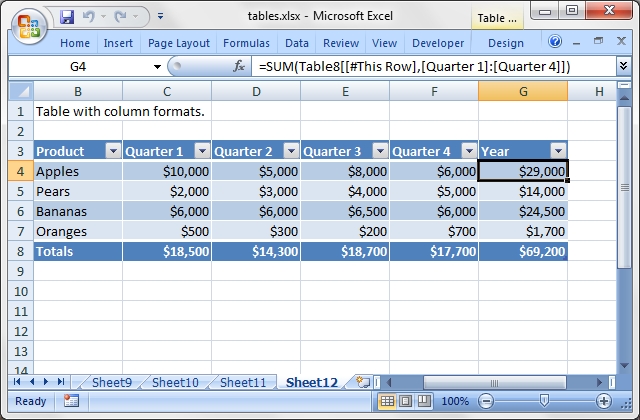
<p>On a related note, I also recently added Excel "Tables" to Excel::Writer::XLSX. Excel Tables are a way of grouping a range of cells into a single entity that has common formatting or that can be referenced from formulas:</p>

<p><img alt="tables.jpg" src="http://blogs.perl.org/users/john_mcnamara/tables.jpg" width="640" height="420" class="mt-image-center" style="text-align: center; display: block; margin: 0 auto 20px;" /></p>
]]>
        

    </content>
</entry>

<entry>
    <title>Goodbye // I&apos;ll miss you</title>
    <link rel="alternate" type="text/html" href="http://blogs.perl.org/users/john_mcnamara/2011/12/goodbye-ill-miss-you.html" />
    <id>tag:blogs.perl.org,2011:/users/john_mcnamara//59.2529</id>

    <published>2011-12-03T02:13:25Z</published>
    <updated>2011-12-03T02:20:11Z</updated>

    <summary>When I started Excel::Writer::XLSX I had, more or less, a clean slate to start with. So I chose to use perl 5.10. It was mainly because I wanted to use the defined-or operator //. There were other reasons as well...</summary>
    <author>
        <name>John McNamara</name>
        <uri>http://search.cpan.org/~jmcnamara/</uri>
    </author>
    
    <category term="excel" label="Excel" scheme="http://www.sixapart.com/ns/types#tag" />
    <category term="excelwriterxlsx" label="Excel::Writer::XLSX" scheme="http://www.sixapart.com/ns/types#tag" />
    <category term="spreadsheetwriteexcel" label="Spreadsheet::WriteExcel" scheme="http://www.sixapart.com/ns/types#tag" />
    
    <content type="html" xml:lang="en" xml:base="http://blogs.perl.org/users/john_mcnamara/">
        <![CDATA[<p>When I started <a href="http://search.cpan.org/~jmcnamara/Excel-Writer-XLSX/">Excel::Writer::XLSX</a> I had, more or less, a clean slate to start with. So I chose to use perl 5.10.</p>

<p>It was mainly because I wanted to use the defined-or operator //. There were other reasons as well but Excel::Writer::XLSX is an API heavy module and, although it may sound trivial, defined-or saved me a lot of time.</p>

<p>I also wanted to use some of the other Modern Perl features. In fact I would really have liked to have used perl 5.14 but I thought that was probably a step too far.</p>

<p>Perl 5.10 isn't exactly new. It came out around the same time that Excel 2007 and the xlsx format came out. So, I thought that it was reasonable to use a recent perl for a module targeting a recent file format.</p>

<p>I was wrong. Clearly organisations upgrade Microsoft Office more frequently then they upgrade perl, because most of the emails and forum posts I got were prefixed with statements along the lines of "We'd like to use Excel::Writer::XLSX but we're stuck on perl 5.8.x".</p>

<p>Most of the people who wrote to me were capable, and generally willing, to upgrade to perl 5.10 but for reasons related to their continued employment, couldn't. I've been in that situation myself. It isn't fair to ask people to install a 5.10 perl binary across tens of Solaris machines even if another part of the company will merrily deploy Office 2010 across hundreds of machines.</p>

<p>I tried to deal with these requests by maintaining a perl 5.8.2 branch on the <a href="https://github.com/jmcnamara/excel-writer-xlsx">GitHub repository</a>. That was initially a pain to maintain but the merges got easier. However, the branch and the head weren't always in sync and I started to get bug reports for the 5.8.2 branch that might or might not exist on the master. Also, some people were unaware of the branch and did their own backport. I also started to program looking over my shoulder at the maintenance branch and thinking "Do I really need // here. If I use || I won't have to port it".</p>

<p>In the end I just gave up and merged the 5.8.2 branch onto the master and as of version 0.38 the minimum perl requirement for <a href="http://search.cpan.org/~jmcnamara/Excel-Writer-XLSX/">Excel::Writer::XLSX on CPAN</a> is perl 5.8.2.</p>

<p>But I swear to God, if I get one single perl 5.6 support request I'll dial the whole thing all the way up to perl 5.14. </p>]]>
        
    </content>
</entry>

<entry>
    <title>Spreadsheet::WriteExcel is dead. Long live Excel::Writer::XLSX.</title>
    <link rel="alternate" type="text/html" href="http://blogs.perl.org/users/john_mcnamara/2011/10/spreadsheetwriteexcel-is-dead-long-live-excelwriterxlsx.html" />
    <id>tag:blogs.perl.org,2011:/users/john_mcnamara//59.2308</id>

    <published>2011-10-18T08:30:07Z</published>
    <updated>2011-10-18T10:16:46Z</updated>

    <summary>Last week I released a new version of Excel::Writer::XLSX to CPAN that was 100% API compatible with Spreadsheet::WriteExcel. This marked a milestone as I am now able to move past WriteExcel&apos;s feature set and move on to new features that...</summary>
    <author>
        <name>John McNamara</name>
        <uri>http://search.cpan.org/~jmcnamara/</uri>
    </author>
    
    <category term="excel" label="Excel" scheme="http://www.sixapart.com/ns/types#tag" />
    <category term="excelwriterxlsx" label="Excel::Writer::XLSX" scheme="http://www.sixapart.com/ns/types#tag" />
    <category term="spreadsheetwriteexcel" label="Spreadsheet::WriteExcel" scheme="http://www.sixapart.com/ns/types#tag" />
    
    <content type="html" xml:lang="en" xml:base="http://blogs.perl.org/users/john_mcnamara/">
        <![CDATA[<p>Last week I released a new version of <a href="http://search.cpan.org/~jmcnamara/Excel-Writer-XLSX/lib/Excel/Writer/XLSX.pm">Excel::Writer::XLSX</a> to CPAN that was 100% API compatible with <a href="http://search.cpan.org/~jmcnamara/Spreadsheet-WriteExcel/lib/Spreadsheet/WriteExcel.pm">Spreadsheet::WriteExcel</a>. This marked a milestone as I am now able to move past WriteExcel's feature set and move on to new features that I wasn't able to support previously.</p>

<p>This was achieved with 30 CPAN releases in almost exactly a year. By comparison, WriteExcel took almost 10 years. This gives a fair indication of the disparity of effort required to implement a feature in the pre-Excel 2007 binary xls format as opposed to the new XML based xlsx format.</p>

<p>So, from now on, all new features will go into Excel::Writer::XLSX and Spreadsheet::WriteExcel will be in maintenance mode only.</p>

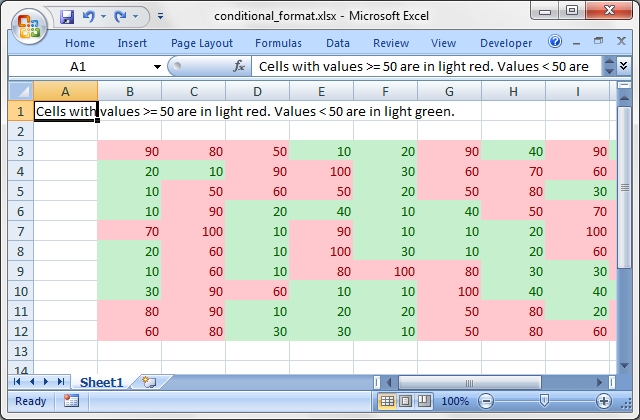
<p>The first of the new features, conditional formatting, was added yesterday.  For a long time has been the most frequently requested feature for WriteExcel but it was always too big a feature to implement in the available time that I had.</p>

<p>With Excel::Writer::XLSX you can now add a format like the following:</p>

<pre><code>$worksheet1-&gt;conditional_formatting( 'B3:K12',
    {
        type     =&gt; 'cell',
        format   =&gt; $light_red,
        criteria =&gt; '&gt;=',
        value    =&gt; 50,
    }
);
</code></pre>

<p>This will result in output like the following, <a href="http://search.cpan.org/~jmcnamara/Excel-Writer-XLSX/lib/Excel/Writer/XLSX/Examples.pm#Example:_conditional_format.pl">full example here</a>:</p>

<p><img alt="conditional_format.jpg" src="http://blogs.perl.org/users/john_mcnamara/conditional_format.jpg" width="640" height="420" class="mt-image-center" style="text-align: center; display: block; margin: 0 auto 20px;" /></p>

<p>Excel::Writer::XLSX has also been designed differently from Spreadsheet::WriteExcel to allow it to implement some features that previously weren't possible (or at least easy). One of these is the separation of the data and the formatting.</p>

<p>It was a common assumption with new users of WriteExcel that you could write data to a spreadsheet and then apply the formatting afterwards. However, for design reasons related to performance and Excel's file format this wasn't easily implemented. With Excel::Writer::XLSX the back-end architecture is different and this type of feature is not only possible but will be added soon.</p>

<p>If you are a user of Spreadsheet::WriteExcel then now is probably a good time to try out <a href="http://search.cpan.org/~jmcnamara/Excel-Writer-XLSX/lib/Excel/Writer/XLSX.pm">Excel::Writer::XLSX</a> so you can get the new features when them come on-line.</p>
]]>
        

    </content>
</entry>

<entry>
    <title>Excel::Writer::XLSX with charts</title>
    <link rel="alternate" type="text/html" href="http://blogs.perl.org/users/john_mcnamara/2011/04/excelwriterxlsx-with-charts.html" />
    <id>tag:blogs.perl.org,2011:/users/john_mcnamara//59.1625</id>

    <published>2011-04-04T07:44:53Z</published>
    <updated>2011-04-04T07:55:10Z</updated>

    <summary>I&apos;ve released a new version of Excel::Writer::XLSX to CPAN with support for charts. The output looks something like this: The example program that generated it is here. I&apos;ll be adding more features in the near future such as chart sub-types,...</summary>
    <author>
        <name>John McNamara</name>
        <uri>http://search.cpan.org/~jmcnamara/</uri>
    </author>
    
    <category term="charts" label="Charts" scheme="http://www.sixapart.com/ns/types#tag" />
    <category term="cpan" label="CPAN" scheme="http://www.sixapart.com/ns/types#tag" />
    <category term="excel" label="Excel" scheme="http://www.sixapart.com/ns/types#tag" />
    
    <content type="html" xml:lang="en" xml:base="http://blogs.perl.org/users/john_mcnamara/">
        <![CDATA[<p>I've released a new version of <a href="http://search.cpan.org/dist/Excel-Writer-XLSX/">Excel::Writer::XLSX</a> to CPAN with support for charts.  </p>

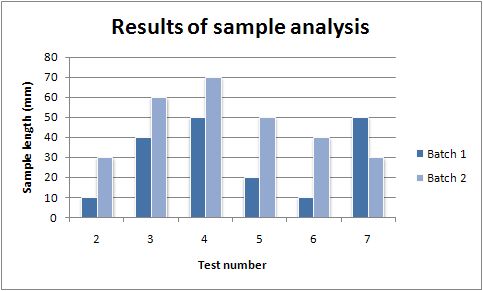
<p>The output looks something like this:</p>

<p><img alt="column1.jpg" src="http://blogs.perl.org/users/john_mcnamara/column1.jpg" width="483" height="291" class="mt-image-center" style="text-align: center; display: block; margin: 0 auto 20px;" /></p>

<p>The example program that generated it is <a href="http://search.cpan.org/dist/Excel-Writer-XLSX/lib/Excel/Writer/XLSX/Chart/Column.pm#EXAMPLE">here</a>.</p>

<p>I'll be adding more features in the near future such as chart sub-types, formatting, hi-lo bars and droplines.</p>

<p>If you are already using the Spreadsheet::WriteExcel charting features, or are interested in using this feature, try it out and let me know what you think.</p>
]]>
        

    </content>
</entry>

<entry>
    <title>Test Driven Development of Excel::Writer::XLSX Part III</title>
    <link rel="alternate" type="text/html" href="http://blogs.perl.org/users/john_mcnamara/2011/03/test-driven-development-of-excelwriterxlsx-part-iii.html" />
    <id>tag:blogs.perl.org,2011:/users/john_mcnamara//59.1550</id>

    <published>2011-03-14T00:53:51Z</published>
    <updated>2011-03-14T01:06:39Z</updated>

    <summary>In the first and second part of this post we looked at how I used Perl&apos;s Test Driven Development to help port Spreadsheet::WriteExcel to Excel::Writer::XLSX. The first two posts dealt with tests at the unit and class level. At the...</summary>
    <author>
        <name>John McNamara</name>
        <uri>http://search.cpan.org/~jmcnamara/</uri>
    </author>
    
    <category term="excel" label="Excel" scheme="http://www.sixapart.com/ns/types#tag" />
    <category term="perl" label="Perl" scheme="http://www.sixapart.com/ns/types#tag" />
    <category term="tdd" label="TDD" scheme="http://www.sixapart.com/ns/types#tag" />
    <category term="testing" label="Testing" scheme="http://www.sixapart.com/ns/types#tag" />
    <category term="tests" label="Tests" scheme="http://www.sixapart.com/ns/types#tag" />
    
    <content type="html" xml:lang="en" xml:base="http://blogs.perl.org/users/john_mcnamara/">
        <![CDATA[<p>In the <a href="http://blogs.perl.org/users/john_mcnamara/2011/02/test-driven-development-of-excelwriterxlsx-part-i.html">first</a> and <a href="http://blogs.perl.org/users/john_mcnamara/2011/02/test-driven-development-of-excelwriterxlsx-part-ii.html">second</a> part of this post we looked at how I used Perl's Test Driven Development to help port <a href="http://search.cpan.org/dist/Spreadsheet-WriteExcel/">Spreadsheet::WriteExcel</a> to <a href="http://search.cpan.org/dist/Excel-Writer-XLSX/">Excel::Writer::XLSX</a>.</p>

<p>The first two posts dealt with tests at the unit and class level. At the package/module level I was able to test the output of Excel::Writer::XLSX against files generated by Excel.</p>

<p>The is something that I had always wanted to do with Spreadsheet::WriteExcel. However, that module never targeted 100% fidelity with Excel because it would have required too much effort. Instead it targeted the minimum possible number of binary records to implement a feature. As such, Spreadsheet::WriteExcel started off with less than 1% of the Excel binary records and even today it still implements less than 50%. The fact that Excel will accept such minimal implementations is a credit to the designers since it allowed me to release small yet functional representations of the file format and add to it incrementally. If I had to provide 50% coverage in the first release the module would never have happened.</p>

<p>The advent of the Excel 2007 XML file format meant that it was now possible to target 100% fidelity. At least for the features that I wished to implement. </p>

<p>As we saw in the first post an Excel XLSX file at its simplest contains the following structure and XML files:</p>

<pre><code> ____ [Content_Types].xml
|
|____ docProps
| |____ app.xml
| |____ core.xml
|
|____ xl
| |____ workbook.xml
| |____ worksheets
| | |____ sheet1.xml
| |
| |____ styles.xml
| |
| |____ theme
| | |____ theme1.xml
| |
| |_____rels
|   |____ workbook.xml.rels
|
|_____rels
  |____ .rels
</code></pre>

<p>To test at this level I use test cases that take an Excel::Writer::XLSX output file and a file generated by Excel, unzip both using <a href="http://search.cpan.org/dist/Archive-Zip/">Archive::Zip</a>, test that the each contain the same files and then tests each XML element of each file. A simplified test case might look like the following:</p>

<pre><code>use lib 't/lib';
use TestFunctions qw(_compare_xlsx_files _is_deep_diff);
use strict;
use warnings;

use Test::More tests =&gt; 1;

# Tests setup.
...    

#######################################################################
#
# Test the creation of a simple Excel::Writer::XLSX file.
#
use Excel::Writer::XLSX;

my $workbook  = Excel::Writer::XLSX-&gt;new( $got_filename );
my $worksheet = $workbook-&gt;add_worksheet();

$worksheet-&gt;write( 'A1', 'Hello' );
$worksheet-&gt;write( 'A2', 123 );

$workbook-&gt;close();


#######################################################################
#
# Compare the generated and existing Excel files.
#

my ( $got, $expected, $caption ) = _compare_xlsx_files(

    $got_filename,
    $exp_filename,
    $ignore_members,
    $ignore_elements,
);

_is_deep_diff( $got, $expected, $caption );
</code></pre>

<p>What is interesting about this is that the central part of the test is an actual Excel::Writer::XLSX program. This code is that same as code used in example programs or in the documentation.</p>

<p>The <code>_compare_xlsx_files()</code> function tests the two aspects of the XLSX file described above, the files (members in Archive::Zip parlance) and the XML elements of the file. A failing test case for files might look like this:</p>

<pre><code>t/regression/simple01.t .. 1/1 
#   Failed test ' _compare_xlsx_files(): Members.'
#   at t/lib/TestFunctions.pm line 268.
# +----+----------------------+----+----------------------------+
# | Elt|Got                   | Elt|Expected                    |
# +----+----------------------+----+----------------------------+
# |   0|[Content_Types].xml   |   0|[Content_Types].xml         |
# |   1|_rels/.rels           |   1|_rels/.rels                 |
# |   2|docProps/app.xml      |   2|docProps/app.xml            |
# |   3|docProps/core.xml     |   3|docProps/core.xml           |
# |    |                      *   4|xl/_rels/workbook.xml.rels  *
# |   4|xl/sharedStrings.xml  |   5|xl/sharedStrings.xml        |
# |   5|xl/styles.xml         |   6|xl/styles.xml               |
# |   6|xl/theme/theme1.xml   |   7|xl/theme/theme1.xml         |
# |   7|xl/workbook.xml       |   8|xl/workbook.xml             |
# +----+----------------------+----+----------------------------+
# Looks like you failed 1 test of 1.
</code></pre>

<p>A failing test for the XML elements within a file might look like this:</p>

<pre><code>t/regression/simple01.t .. 1/1 
#   Failed test ' _compare_xlsx_files(): xl/sharedStrings.xml'
#   at t/lib/TestFunctions.pm line 268.
# +----+-------------------------+----------------------------+
# | Elt|Got                      |Expected                    |
# +----+-------------------------+----------------------------+
# |   2|&lt;si&gt;                     |&lt;si&gt;                        |
# *   3|&lt;t&gt;_hello&lt;/t&gt;            |&lt;t&gt;Hello&lt;/t&gt;                *
# |   4|&lt;/si&gt;                    |&lt;/si&gt;                       |
# |   5|&lt;/sst&gt;                   |&lt;/sst&gt;                      |
# +----+-------------------------+----------------------------+
# Looks like you failed 1 test of 1.
</code></pre>

<p>Again, this is making extensive use of <a href="http://search.cpan.org/dist/Test-Differences/">Test::Differences</a> as shown in the <a href="http://blogs.perl.org/users/john_mcnamara/2011/02/test-driven-development-of-excelwriterxlsx-part-ii.html">previous post</a>.</p>

<p>It is also possible with this technique to ignore certain files or elements such as timestamps, certain randomly generated indexes and user specific metadata.</p>

<p>So in summary, I was able to to use Perl's test driven development techniques at the unit, class and package level against actual Excel data to accelerate porting of several years of work into several months. Added to this, I now have a comprehensive regression suite so that I can tackle refactoring with the confidence that I am not breaking any existing features.</p>

<p>This doesn't mean that the module is bug free, it isn't and end users often find interactions that I haven't tested, but I can quickly respond to test reports using the same techniques.</p>

<p>All in all, this has meant that the development of Excel::Writer::XLSX has been a lot less painful process than Spreadsheet::WriteExcel and has made me more inclined to add new features.</p>
]]>
        

    </content>
</entry>

<entry>
    <title>Test Driven Development of Excel::Writer::XLSX Part II</title>
    <link rel="alternate" type="text/html" href="http://blogs.perl.org/users/john_mcnamara/2011/02/test-driven-development-of-excelwriterxlsx-part-ii.html" />
    <id>tag:blogs.perl.org,2011:/users/john_mcnamara//59.1513</id>

    <published>2011-02-28T08:51:56Z</published>
    <updated>2011-03-22T20:23:17Z</updated>

    <summary>Test Driven Development of Excel::Writer::XLSX Part II In the first part of this post we looked at how I used auto-generated code and tests to speed up the re-write of Spreadsheet::WriteExcel into Excel::Writer::XLSX. This dealt with tests at the unit...</summary>
    <author>
        <name>John McNamara</name>
        <uri>http://search.cpan.org/~jmcnamara/</uri>
    </author>
    
    <category term="excel" label="Excel" scheme="http://www.sixapart.com/ns/types#tag" />
    <category term="perl" label="Perl" scheme="http://www.sixapart.com/ns/types#tag" />
    <category term="tdd" label="TDD" scheme="http://www.sixapart.com/ns/types#tag" />
    <category term="testing" label="Testing" scheme="http://www.sixapart.com/ns/types#tag" />
    <category term="tests" label="Tests" scheme="http://www.sixapart.com/ns/types#tag" />
    
    <content type="html" xml:lang="en" xml:base="http://blogs.perl.org/users/john_mcnamara/">
        <![CDATA[<p>Test Driven Development of Excel::Writer::XLSX Part II</p>

<p>In the <a href="http://blogs.perl.org/users/john_mcnamara/2011/02/test-driven-development-of-excelwriterxlsx-part-i.html">first part of this post</a> we looked at how I used auto-generated code and tests to speed up the re-write of Spreadsheet::WriteExcel into <a href="http://search.cpan.org/dist/Excel-Writer-XLSX/">Excel::Writer::XLSX</a>.</p>

<p>This dealt with tests at the unit or method level. At the class level I was able to use tests that compared module results against actual XML from an Excel XLSX file. The following is an extract from an example test case. The XML in the DATA section is from an Excel file, pretty printed via xmllint.</p>

<pre><code>###########################################################################
#
# Test the _assemble_xml_file() method.
#
$caption = " \tWorksheet: _assemble_xml_file()";

$worksheet = _new_worksheet(\$got);

$worksheet-&gt;select();
$worksheet-&gt;_assemble_xml_file();

$expected = _expected_to_aref();
$got      = _got_to_aref( $got );

_is_deep_diff( $got, $expected, $caption );

__DATA__
&lt;?xml version="1.0" encoding="UTF-8" standalone="yes"?&gt;
&lt;worksheet xmlns="http://schemas.openxmlformats.org/spreadsheetml/2006/main""&gt;
  &lt;dimension ref="A1"/&gt;
  &lt;sheetViews&gt;
    &lt;sheetView tabSelected="1" workbookViewId="0"/&gt;
  &lt;/sheetViews&gt;
  &lt;sheetFormatPr defaultRowHeight="15"/&gt;
  &lt;sheetData/&gt;
  &lt;pageMargins left="0.7" right="0.7" top="0.75" bottom="0.75"/&gt;
&lt;/worksheet&gt;
</code></pre>

<p>The <code>_is_deep_diff()</code> test function used in the test above is a wrapper for the <a href="http://search.cpan.org/dist/Test-Differences/">Test::Differences</a> <code>eq_or_diff()</code> test method.</p>

<p>I prefer not to impose Test module dependencies on the end user unless they are necessary. In this case the <code>_is_deep_diff()</code> test function uses Test::Differences if it is available and falls back to the core Test::More <code>is_deeply()</code> function if it is not.</p>

<p>The Test::Differences output for a failing test case might look like the following:</p>

<pre><code>$ prove -l t/worksheet/worksheet_01.t 
t/worksheet/worksheet_01.t .. 1/1 
#   Failed test '   Worksheet: _assemble_xml_file()'
#   at t/lib/TestFunctions.pm line 268.
# +----+----------------------------------+--------------------------------+
# | Elt|Got                               |Expected                        |
# +----+----------------------------------+--------------------------------+
# |   5|&lt;/sheetViews&gt;                     |&lt;/sheetViews&gt;                   |
# *   6|&lt;sheetFormatPr default="12.5" /&gt;  |&lt;sheetFormatPr default="15" /&gt;  *
# |   7|&lt;sheetData /&gt;                     |&lt;sheetData /&gt;                   |
# +----+----------------------------------+--------------------------------+
# Looks like you failed 1 test of 1.
</code></pre>

<p>If you are going to invest time in Test Driven Development then in practice you are going to spend a lot of time looking at the output of failing test cases. As such I find the the diff style context of Test::Difference to be invaluable, particularly when there is more than one difference in the failing test case.</p>

<p>In the <a href="http://blogs.perl.org/users/john_mcnamara/2011/03/test-driven-development-of-excelwriterxlsx-part-iii.html">next part of this blog</a> I'll demonstrate the final component of the test framework where I test complete Excel files against the output of Excel::Writer::XLSX.</p>
]]>
        

    </content>
</entry>

<entry>
    <title>Test Driven Development of Excel::Writer::XLSX Part I </title>
    <link rel="alternate" type="text/html" href="http://blogs.perl.org/users/john_mcnamara/2011/02/test-driven-development-of-excelwriterxlsx-part-i.html" />
    <id>tag:blogs.perl.org,2011:/users/john_mcnamara//59.1507</id>

    <published>2011-02-26T16:14:38Z</published>
    <updated>2011-02-28T09:29:38Z</updated>

    <summary>For the last few months I have been porting Spreadsheet::WriteExcel to the new Excel 2007+ file format. The older Excel file format was comprised of sequential binary records whilst the new file format is a collection of XML files in...</summary>
    <author>
        <name>John McNamara</name>
        <uri>http://search.cpan.org/~jmcnamara/</uri>
    </author>
    
    <category term="perlexcelteststestingtdd" label="Perl Excel Tests Testing TDD" scheme="http://www.sixapart.com/ns/types#tag" />
    
    <content type="html" xml:lang="en" xml:base="http://blogs.perl.org/users/john_mcnamara/">
        <![CDATA[<p>For the last few months I have been porting Spreadsheet::WriteExcel to the new Excel 2007+ file format.</p>

<p>The older Excel file format was comprised of sequential binary records whilst the new file format is a collection of XML files in a zip container.</p>

<p>The newer module maintains the same API as Spreadsheet::WriteExcel but is in a different namespace. It is called <a href="http://search.cpan.org/dist/Excel-Writer-XLSX/">Excel::Writer::XLSX</a>.</p>

<p>Some of the test driven development aspects of writing Excel::Writer::XLSX have been interesting and I'd thought that I'd blog about them here.</p>

<p>At its simplest an Excel XLSX file contains the following elements:</p>

<pre><code> ____ [Content_Types].xml
|
|____ docProps
| |____ app.xml
| |____ core.xml
|
|____ xl
| |____ workbook.xml
| |____ worksheets
| | |____ sheet1.xml
| |
| |____ styles.xml
| |
| |____ theme
| | |____ theme1.xml
| |
| |____ _rels
|   |____ workbook.xml.rels
|
|____ _rels
  |____ .rels
</code></pre>

<p>The .xml files contain the data and the .rels files link them together. These are all zipped into a single .xlsx file.</p>

<p>Since the files are XML based I initially considered generating them with a Class to XML mapper. However, interactions between individual files and between elements within the files made simple mapping impossible.</p>

<p>In the end I settled on using XML::Writer and statically auto-generating methods for outputting individual XML elements.</p>

<p>So, for example in the <code>Sheet1.xml</code> worksheet file shown above a typical element representing the page setup settings might look like this:</p>

<pre><code>&lt;pageSetup paperSize="9" orientation="landscape" /&gt;
</code></pre>

<p>I extract this from a sample file and use a small Perl program to auto-generate the code for creating the XML element. The output looks something like the following:</p>

<pre><code># Write the pageSetup element.
$self-&gt;_write_page_setup();


##########################################################################
#
# _write_page_setup()
#
# Write the &lt;pageSetup&gt; element.
#
sub _write_page_setup {

    my $self        = shift;
    my $paper_size  = 9;
    my $orientation = 'landscape';

    my @attributes = (
        'paperSize'   =&gt; $paper_size,
        'orientation' =&gt; $orientation,
    );

    $self-&gt;{_writer}-&gt;emptyTag( 'pageSetup', @attributes );
}
</code></pre>

<p>More importantly it also auto-generates a test case for the method like this:</p>

<pre><code>###########################################################################
#
# Tests for Excel::Writer::XLSX::Worksheet methods.
#
# reverse('©'), January 2011, John McNamara, jmcnamara@cpan.org
#

use lib 't/lib';
use TestFunctions '_new_worksheet';
use strict;
use warnings;

use Test::More tests =&gt; 1;


###########################################################################
#
# Tests setup.
#
my $expected;
my $got;
my $caption;
my $worksheet;


###########################################################################
#
# Test the _write_page_setup() method.
#
$caption  = " \tWorksheet: _write_page_setup()";
$expected = '&lt;pageSetup paperSize="9" orientation="landscape" /&gt;';

$worksheet = _new_worksheet(\$got);

$worksheet-&gt;_write_page_setup();

is( $got, $expected, $caption );

__END__
</code></pre>

<p>In the simplest cases the new method will work as expected and the test case will pass first time. In most cases the method will need some additional code to handle non-default cases and more tests will have to be added. However, as a minimum all new methods will have a test case.</p>

<p>If you are interested in seeing the final implementation of the test case have a look at <a href="http://cpansearch.perl.org/src/JMCNAMARA/Excel-Writer-XLSX-0.14/t/worksheet/sub_write_page_setup.t"><code>sub_write_page_setup.t</code></a> and the code for the method that it tests <a href="http://cpansearch.perl.org/src/JMCNAMARA/Excel-Writer-XLSX-0.14/lib/Excel/Writer/XLSX/Worksheet.pm"><code>write_page_setup()</code></a> (search down).</p>

<p>There are currently around 200 test files and 1100 test cases in the Excel::Writer::XLSX test suite and the test code base is around 18 KLOC for a code base of around 16 KLOC.</p>

<p>The methodology of generating test cases and code together has been quite successful and in less than 6 months I have been able to re-write 90% of the methods of Spreadsheet::WriteExcel which took over 10 years to write in the first place.</p>

<p>This productivity has been helped greatly by having a pre-defined and unchanging specification in the form of the Spreadsheet::WriteExcel API and existing documentation and examples. This in not insignificant since these elements probably comprised around 50% of the effort that went into Spreadsheet::WriteExcel.</p>

<p>Another advantage of the new module is that I am able to test complete files generated by Excel::Writer::XLSX against files generated by Excel.</p>

<p>I'll write about that in <a href="http://blogs.perl.org/users/john_mcnamara/2011/02/test-driven-development-of-excelwriterxlsx-part-ii.html">a separate post</a>.</p>
]]>
        

    </content>
</entry>

<entry>
    <title>Excel::Writer::XLSX</title>
    <link rel="alternate" type="text/html" href="http://blogs.perl.org/users/john_mcnamara/2010/10/excelwriterxlsx.html" />
    <id>tag:blogs.perl.org,2010:/users/john_mcnamara//59.1105</id>

    <published>2010-10-11T23:12:38Z</published>
    <updated>2010-10-11T23:16:15Z</updated>

    <summary> I have released a new module to CPAN for writing Excel files in the 2007 XLSX format: Excel::Writer::XLSX It uses the Spreadsheet::WriteExcel interface but is in a different namespace for reasons of maintainability. Not all of the features of...</summary>
    <author>
        <name>John McNamara</name>
        <uri>http://search.cpan.org/~jmcnamara/</uri>
    </author>
    
    <category term="cpan" label="CPAN" scheme="http://www.sixapart.com/ns/types#tag" />
    <category term="excel" label="Excel" scheme="http://www.sixapart.com/ns/types#tag" />
    <category term="spreadsheetwriteexcel" label="Spreadsheet::WriteExcel" scheme="http://www.sixapart.com/ns/types#tag" />
    
    <content type="html" xml:lang="en" xml:base="http://blogs.perl.org/users/john_mcnamara/">
        <![CDATA[<p><br />
I have released a new module to CPAN for writing Excel files in the 2007 XLSX format: <a href="http://search.cpan.org/dist/Excel-Writer-XLSX/">Excel::Writer::XLSX</a></p>

<p>It uses the Spreadsheet::WriteExcel interface but is in a different namespace for reasons of maintainability.</p>

<p>Not all of the features of Spreadsheet::WriteExcel are supported but they will be in time. </p>

<p>The main advantage of the XLSX format over the XLS format for the end user is that it allows 1,048,576 rows x 16,384 columns, if you can see that as an advantage.</p>

<p>From a development point of view the main advantage is that the XLSX format is XML based and as such is much easier to debug and test than the XLS binary format.</p>

<p>It has become increasingly difficult to carve out the time required to add new features to Spreadsheet::WriteExcel. Even something as seemingly innocuous as adding trendlines to charts could take up to a month of reverse engineering, debugging, testing and implementation.</p>

<p>Hopefully the XLSX format will allow for faster, easier test driven development and may entice in some other contributors.</p>]]>
        
    </content>
</entry>

<entry>
    <title>Pod to ePub to iBooks (Part 2)</title>
    <link rel="alternate" type="text/html" href="http://blogs.perl.org/users/john_mcnamara/2010/08/pod-to-epub-to-ibooks-part-2.html" />
    <id>tag:blogs.perl.org,2010:/users/john_mcnamara//59.922</id>

    <published>2010-08-19T14:37:16Z</published>
    <updated>2010-08-20T12:13:21Z</updated>

    <summary>I blogged a small while back about converting Pod to ePub format for reading with iBooks or with other eBook readers. The first release of App::Pod2Epub and pod2epub is now available on CPAN and GitHub and below are some screenshots....</summary>
    <author>
        <name>John McNamara</name>
        <uri>http://search.cpan.org/~jmcnamara/</uri>
    </author>
    
    <category term="ebooks" label="eBooks" scheme="http://www.sixapart.com/ns/types#tag" />
    <category term="iphone" label="iPhone" scheme="http://www.sixapart.com/ns/types#tag" />
    <category term="pod" label="Pod" scheme="http://www.sixapart.com/ns/types#tag" />
    
    <content type="html" xml:lang="en" xml:base="http://blogs.perl.org/users/john_mcnamara/">
        <![CDATA[<p>I blogged a small while back about <a href="http://blogs.perl.org/users/john_mcnamara/2010/07/pod-to-epub-to-ibooks.html">converting Pod to ePub format</a> for reading with iBooks or with other eBook readers.</p>

<p>The first release of App::Pod2Epub and pod2epub is now available on <a href="http://search.cpan.org/~jmcnamara/App-Pod2Epub/">CPAN</a> and <a href="http://github.com/jmcnamara/app-pod2epub">GitHub</a> and below are some screenshots. </p>

<p>This is a screenshot from an iPhone of four Perl eBooks along with some eBooks from the iBooks store. The Perl eBooks are displayed with the default cover image. User definable cover images will be enabled as soon as I have debugged it.</p>

<p><img alt="epub01.png" src="http://blogs.perl.org/users/john_mcnamara/epub01.png" width="320" height="480" class="mt-image-center" style="text-align: center; display: block; margin: 0 auto 20px;" /></p>

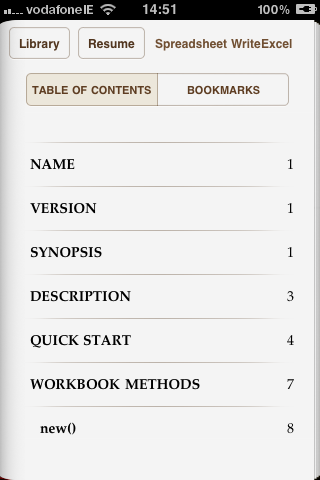
<p>This image shows the table of contents for one of the eBooks showing chapters corresponding to Pod <tt>=head1</tt> and <tt>=head2</tt> levels.</p>

<p><img alt="epub02.png" src="http://blogs.perl.org/users/john_mcnamara/epub02.png" width="320" height="480" class="mt-image-center" style="text-align: center; display: block; margin: 0 auto 20px;" /></p>

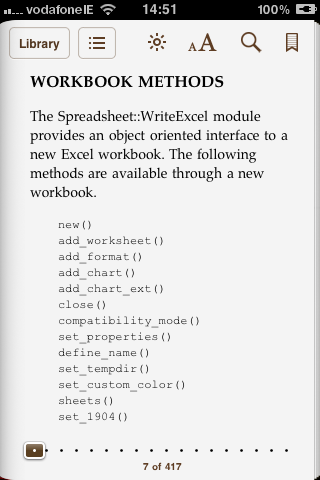
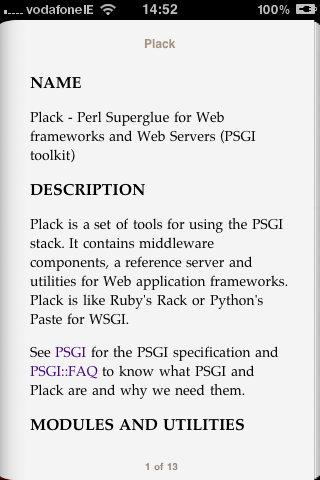
<p>Two book pages. The format of the text is configurable via user supplied CSS stylesheets. These images show the default pod2epub formatting.</p>

<p><img alt="epub03.png" src="http://blogs.perl.org/users/john_mcnamara/epub03.png" width="320" height="480" class="mt-image-center" style="text-align: center; display: block; margin: 0 auto 20px;" /></p>

<p><img alt="epub04.png" src="http://blogs.perl.org/users/john_mcnamara/epub04.png" width="320" height="480" class="mt-image-center" style="text-align: center; display: block; margin: 0 auto 20px;" /></p>

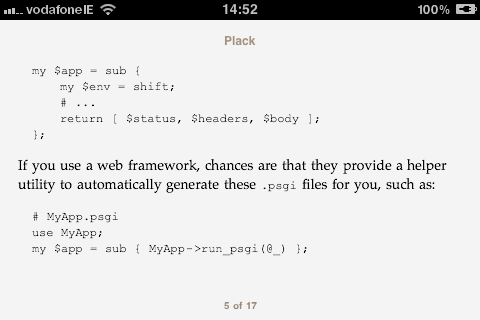
<p>A rotated page for better viewing of the code.</p>

<p><img alt="epub05.png" src="http://blogs.perl.org/users/john_mcnamara/epub05.png" width="480" height="320" class="mt-image-center" style="text-align: center; display: block; margin: 0 auto 20px;" /></p>

<p></p>

<p>There are <a href="http://search.cpan.org/~jmcnamara/App-Pod2Epub/bin/pod2epub#TODO">still quite a few things to add</a> but if you encounter any issues or have any suggestions let me know.</p>

<p><br />
<b>Update:</b> The option to add cover art has been added as of version 0.03.</p>]]>
        
    </content>
</entry>

<entry>
    <title>Pod to ePub to iBooks</title>
    <link rel="alternate" type="text/html" href="http://blogs.perl.org/users/john_mcnamara/2010/07/pod-to-epub-to-ibooks.html" />
    <id>tag:blogs.perl.org,2010:/users/john_mcnamara//59.776</id>

    <published>2010-07-21T08:54:23Z</published>
    <updated>2010-07-21T09:13:02Z</updated>

    <summary>Olaf Alders&apos;s recent post about CPAN on your iPhone gave me the impetus to look at an idea I had after iBooks became available on the iPhone and iPad: to convert Perl Pod documents to ePub format for offline reading....</summary>
    <author>
        <name>John McNamara</name>
        <uri>http://search.cpan.org/~jmcnamara/</uri>
    </author>
    
    <category term="podebooksiphone" label="Pod eBooks iPhone" scheme="http://www.sixapart.com/ns/types#tag" />
    
    <content type="html" xml:lang="en" xml:base="http://blogs.perl.org/users/john_mcnamara/">
        <![CDATA[<p>Olaf Alders's recent post about <a href="http://blogs.perl.org/users/olaf_alders/2010/07/icpan-cpan-on-your-iphone.html">CPAN on your iPhone</a> gave me the impetus to look at an idea I had after <a href="http://en.wikipedia.org/wiki/IBooks">iBooks</a> became available on the iPhone and iPad: to convert Perl Pod documents to <a href="http://en.wikipedia.org/wiki/Epub">ePub </a>format for offline reading. </p>

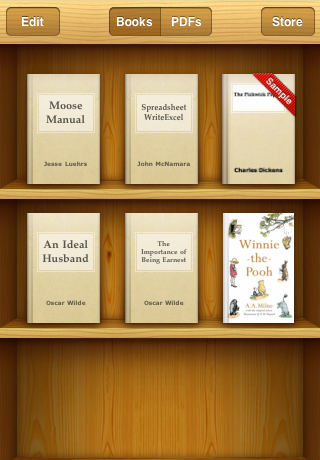
<p>So I created a simple pod2epub program and here are the results along with some free books from the iBooks store:</p>

<p><img alt="ibooks01.png" src="http://blogs.perl.org/users/john_mcnamara/ibooks01.png" width="320" height="460" class="mt-image-center" style="text-align: center; display: block; margin: 0 auto 20px;" /></p>

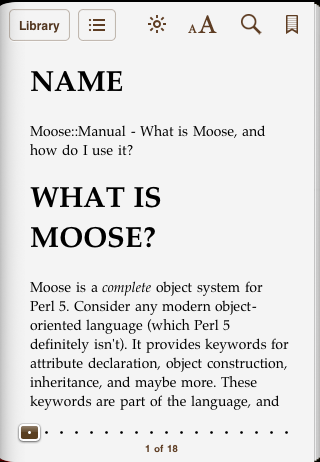
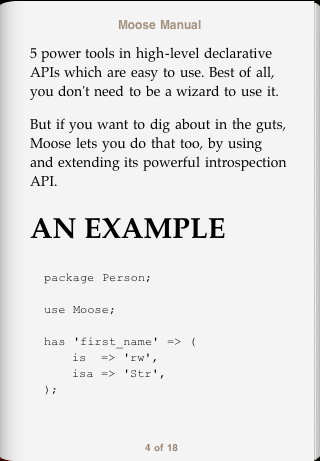
<p>The screen shot shows the <a href="http://search.cpan.org/~doy/Moose/lib/Moose/Manual.pod">Moose::Manual</a> and <a href="http://search.cpan.org/~jmcnamara/Spreadsheet-WriteExcel/lib/Spreadsheet/WriteExcel.pm">Spreadsheet::WriteExcel</a> documentation converted to ePub and transferred to iBooks on my iPhone. Here is a sample from the Moose::Manual ebook:</p>

<p><img alt="ibooks02.png" src="http://blogs.perl.org/users/john_mcnamara/ibooks02.png" width="320" height="462" class="mt-image-center" style="text-align: center; display: block; margin: 0 auto 20px;" /></p>

<p>And here is another with some code:</p>

<p><img alt="ibooks03.png" src="http://blogs.perl.org/users/john_mcnamara/ibooks03.png" width="320" height="461" class="mt-image-center" style="text-align: center; display: block; margin: 0 auto 20px;" /></p>

<p>All of the heavy lifting was done with the stalwart <a href="http://search.cpan.org/~dwheeler/Pod-Simple/lib/Pod/Simple.pod">Pod::Simple</a> and Oleksandr Tymoshenko's comprehensive <a href="http://search.cpan.org/~oty/EBook-EPUB/lib/EBook/EPUB.pm">EBook::EPUB</a>.</p>

<p>I still have a few issues to resolve and formatting to tweak and after that I will upload the code to Github and then to CPAN</p>]]>
        
    </content>
</entry>

<entry>
    <title>Yet Another Perl 6 Logo</title>
    <link rel="alternate" type="text/html" href="http://blogs.perl.org/users/john_mcnamara/2010/07/yet-another-perl-6-logo.html" />
    <id>tag:blogs.perl.org,2010:/users/john_mcnamara//59.751</id>

    <published>2010-07-14T06:34:13Z</published>
    <updated>2010-07-14T07:04:48Z</updated>

    <summary>I recently saw Sebastian Riedel&apos;s designs for Perl logos, which I like quite a lot, and it reminded me of some of my own ideas in this area. When the Camelia logo came out I created a few designs for...</summary>
    <author>
        <name>John McNamara</name>
        <uri>http://search.cpan.org/~jmcnamara/</uri>
    </author>
    
    <category term="perl6" label="perl6" scheme="http://www.sixapart.com/ns/types#tag" />
    
    <content type="html" xml:lang="en" xml:base="http://blogs.perl.org/users/john_mcnamara/">
        <![CDATA[<p>I recently saw <a href="http://blog.kraih.com/a-logo-for-perl">Sebastian Riedel's designs for Perl logos</a>, which I like quite a lot, and it reminded me of some of my own ideas in this area.</p>

<p>When the <a href="http://perl6.org/">Camelia </a>logo came out I created a few designs for a variation on the butterfly logo based on twin infinities. I don't really have the skill to render them as artistically or as polished as I would wish but the basic idea was something like the following:</p>

<p><img alt="Perl6_inifinities_01.jpg" src="http://blogs.perl.org/users/john_mcnamara/Perl6_inifinities_01.jpg" width="264" height="246" class="mt-image-center" style="text-align: center; display: block; margin: 0 auto 20px;" /></p>

<p>Or with the lower half smaller to emphasise the butterfly shape:</p>

<p><img alt="Perl6_inifinities_02.jpg" src="http://blogs.perl.org/users/john_mcnamara/Perl6_inifinities_02.jpg" width="269" height="247" class="mt-image-center" style="text-align: center; display: block; margin: 0 auto 20px;" /></p>

<p>Or with rotation:</p>

<p><img alt="Perl6_inifinities_03.jpg" src="http://blogs.perl.org/users/john_mcnamara/Perl6_inifinities_03.jpg" width="299" height="300" class="mt-image-center" style="text-align: center; display: block; margin: 0 auto 20px;" /></p>

<p>If you like this idea and have some artistic flair maybe you could create some more colourful and or polished variations on this theme.</p>]]>
        
    </content>
</entry>

<entry>
    <title>Looking for help with decryption in Spreadsheet::ParseExcel</title>
    <link rel="alternate" type="text/html" href="http://blogs.perl.org/users/john_mcnamara/2010/01/looking-for-help-with-decryption-in-spreadsheetparseexcel.html" />
    <id>tag:blogs.perl.org,2010:/users/john_mcnamara//59.202</id>

    <published>2010-01-22T00:39:14Z</published>
    <updated>2010-01-22T00:44:05Z</updated>

    <summary>I am the current maintainer of Spreadsheet::ParseExcel and I am looking for help from some people with an interest in cryptography in Perl. I would like to extend Spreadsheet::ParseExcel to parse encrypted Excel files with user supplied or default passwords....</summary>
    <author>
        <name>John McNamara</name>
        <uri>http://search.cpan.org/~jmcnamara/</uri>
    </author>
    
    <category term="cpan" label="CPAN" scheme="http://www.sixapart.com/ns/types#tag" />
    <category term="modules" label="Modules" scheme="http://www.sixapart.com/ns/types#tag" />
    <category term="spreadsheetparseexcel" label="Spreadsheet::ParseExcel" scheme="http://www.sixapart.com/ns/types#tag" />
    
    <content type="html" xml:lang="en" xml:base="http://blogs.perl.org/users/john_mcnamara/">
        <![CDATA[<p>I am the current maintainer of <a href="http://search.cpan.org/dist/Spreadsheet-ParseExcel/">Spreadsheet::ParseExcel</a> and I am looking for help from some people with an interest in cryptography in Perl.</p>

<p>I would like to extend Spreadsheet::ParseExcel to parse encrypted Excel files with user supplied or default passwords. This is a frequently requested feature from end users.</p>

<p>The problem is as follows. At its most basic level an Excel file is comprised of sequential binary records like this:</p>

<pre><code>Name     Length   Data 
2 bytes  2 bytes  variable length
</code></pre>

<p>When the file is encrypted some additional unencrypted records are added to the start of the file to define the encryption type (usually RC4) along with some information such as salt and verifier hash. The Data segment of the subsequent records, but not the Name or Length bytes, are then encrypted. </p>

<p>I would like to add a function that decrypts the data block using the a password and returns the unencrypted data so that ParseExcel can continue to parse the data. There is also a class of files that are encrypted but can be decrypted without a password (or with a default password) that I would also like to be able to handle.</p>

<p>The encryption algorithms are reasonably well documented and I can point anyone who is interested to various sources including documentation from Microsoft. I can also provide some debugging tools and I can provide an encrypted version of the test suite.</p>

<p>Note, I am not interested in brute force decryption of Excel files. Only the user supplied and default password cases.</p>

<p>I could probably figure it out myself but I have a large number of other issues to deal with and this task would suit someone with some experience and interest in cryptography.</p>

<p>If you are interested <a href="mailto://jmcnamara@cpan.org">drop me a line</a>.</p>

<h2>John.</h2>

<p>Also posted on <a href="http://www.perlmonks.com/?node_id=818851">Perlmonks</a>.</p>
]]>
        

    </content>
</entry>

<entry>
    <title>Bubbles and Doughnuts and Radar</title>
    <link rel="alternate" type="text/html" href="http://blogs.perl.org/users/john_mcnamara/2010/01/bubbles-and-doughnuts-and-radar.html" />
    <id>tag:blogs.perl.org,2010:/users/john_mcnamara//59.182</id>

    <published>2010-01-11T19:01:25Z</published>
    <updated>2010-01-12T10:28:18Z</updated>

    <summary>Spreadsheet::WriteExcel now supports Area, Bar, Column, Line, Pie, Scatter and Stock chart types. I think that I&apos;ll leave it at that for now and concentrate on the sub-types within those charts. Bubbles and Doughnuts and Radar will have to wait...</summary>
    <author>
        <name>John McNamara</name>
        <uri>http://search.cpan.org/~jmcnamara/</uri>
    </author>
    
    <category term="cpan" label="CPAN" scheme="http://www.sixapart.com/ns/types#tag" />
    <category term="modules" label="Modules" scheme="http://www.sixapart.com/ns/types#tag" />
    <category term="spreadsheetwriteexcel" label="Spreadsheet::WriteExcel" scheme="http://www.sixapart.com/ns/types#tag" />
    
    <content type="html" xml:lang="en" xml:base="http://blogs.perl.org/users/john_mcnamara/">
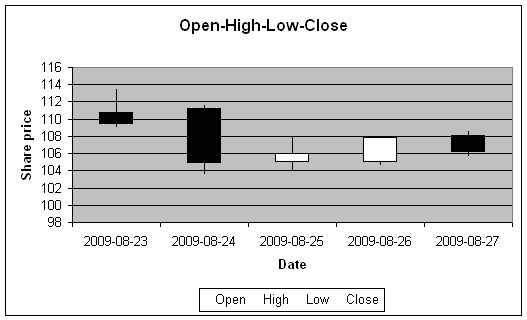
        <![CDATA[<p>Spreadsheet::WriteExcel now supports Area, Bar, Column, Line, Pie, Scatter and Stock chart types. I think that I'll leave it at that for now and concentrate on the sub-types within those charts. <a href="http://office.microsoft.com/en-us/excel/HA010346071033.aspx">Bubbles and Doughnuts and Radar</a> will have to wait untill later. Anyone use those?</p>

<p>Here are some <a href="http://search.cpan.org/~jmcnamara/Spreadsheet-WriteExcel-2.35/lib/Spreadsheet/WriteExcel/Examples.pm#Example:_chart_area.pl">example programs with screenshots</a> and here is the output from the Stock example:</p>

<p><img alt="stock1.jpg" src="http://blogs.perl.org/users/john_mcnamara/stock1.jpg" width="527" height="320" class="mt-image-none" style="" /></p>
]]>
        

    </content>
</entry>

<entry>
    <title>Spreadsheet::WriteExcel with embedded charts</title>
    <link rel="alternate" type="text/html" href="http://blogs.perl.org/users/john_mcnamara/2010/01/spreadsheetwriteexcel-with-embedded-charts.html" />
    <id>tag:blogs.perl.org,2010:/users/john_mcnamara//59.161</id>

    <published>2010-01-04T11:44:32Z</published>
    <updated>2010-01-04T15:55:33Z</updated>

    <summary>I&apos;ve added a feature to Spreadsheet::WriteExcel to allow programmatically generated charts to be embedded in worksheets. Here is an example which will generate something like this:...</summary>
    <author>
        <name>John McNamara</name>
        <uri>http://search.cpan.org/~jmcnamara/</uri>
    </author>
    
    <category term="cpan" label="CPAN" scheme="http://www.sixapart.com/ns/types#tag" />
    <category term="modules" label="Modules" scheme="http://www.sixapart.com/ns/types#tag" />
    <category term="spreadsheetwriteexcel" label="Spreadsheet::WriteExcel" scheme="http://www.sixapart.com/ns/types#tag" />
    
    <content type="html" xml:lang="en" xml:base="http://blogs.perl.org/users/john_mcnamara/">
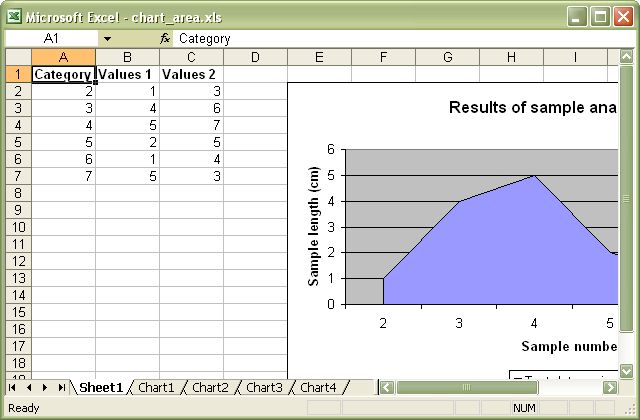
        <![CDATA[<p>I've added a feature to  <a href="http://search.cpan.org/~jmcnamara/Spreadsheet-WriteExcel">Spreadsheet::WriteExcel</a> to allow programmatically generated charts to be embedded in worksheets.</p>

<p>Here is an <a href="http://search.cpan.org/~jmcnamara/Spreadsheet-WriteExcel-2.33/lib/Spreadsheet/WriteExcel/Examples.pm#Example:_chart_area.pl">example</a> which will generate something like this:</p>

<p><img alt="chart_area.jpg" src="http://blogs.perl.org/users/john_mcnamara/chart_area.jpg" width="640" height="420" class="mt-image-center" style="text-align: center; display: block; margin: 0 auto 20px;" /></p>
]]>
        

    </content>
</entry>

</feed>