Results matching “perl6”

Perl 6: Comb It!

In Perl 5, I always appreciated the convenience of constructs like these two:

my @things = $text =~ /thing/g;
my %things = $text =~ /(key)...(value)/g;

You take some nice, predictable text, pop a regex next to it, and BOOM! You get a nice list of things or a pretty hash. Magical!

There are some similarities to this construct in Perl 6, but if you're a new programmer, with Perl 5 background, there might be some confusion. First, using several captures doesn't result in nice hashes right off the bat. Second, you don't get strings, you get Match objects.

While Matches are fine, let's look at a tool more suited for the job: The comb

20160425-Perl6-Comb-It.jpg

Plain 'Ol Characters

You can use comb as a subroutine or as a method. In its basic form, comb simply breaks up strings into characters:

'foobar moobar 駱駝道bar'.comb.join('|').say;
'foobar moobar 駱駝道bar'.comb(6).join('|').say;

# OUTPUT:
# f|o|o|b|a|r| |m|o|o|b|a|r| |駱|駝|道|b|a|r
# foobar| mooba|r 駱駝道b|ar

Without arguments, you get individual characters. Supply an integer and you'll get a list of strings at most that many characters long, receiving a shorter string when there are not enough characters left. This method is also about 30x faster than using a regex for the job.

Limits

You can also provide a second integer, the limit, to indicate that you want at most that many items in the final list:

'foobar moobar 駱駝道bar'.comb(1, 5).join('|').say;
'foobar moobar 駱駝道bar'.comb(6, 2).join('|').say;

# OUTPUT:
# f|o|o|b|a
# foobar| mooba

This applies to all forms of using comb, not just the one shown above.

Counting Things

The comb also takes a regular Str as an argument, returning a list of matches containing... that string. So this is useful to get the total number the substring appears inside a string:

'The 🐈 ran after a 🐁, but the 🐁 ran away'.comb('🐈').Int.say;
'The 🐈 ran after a 🐁, but the 🐁 ran away'.comb('ran').Int.say;

# OUTPUT:
# 1
# 2

Simple Matching

Moving onto the realm of regexes, there are several ways to obtain what you want using comb. The simplest way is to just match what you want. The entire match will be returned as an item by the comb:

'foobar moobar 駱駝道bar'.comb(/<[a..z]>+ 'bar'/).join('|').say;

# OUTPUT:
# foobar|moobar

The bar with Rakuda-dō Japaneese characters did not match our a through z character class and so was excluded from the list.

The wildcard match can be useful, but sometimes you don't want to include the wildcard in the resulting strings... Well, good news!

Limit What's Captured

You could use look-around assertions but an even simpler way is to use <( and )> regex capture markers (<( is similar to \K in Perl 5):

'moo=meow ping=pong'.comb(/\w+    '=' <( \w**4/).join('|').say; # values
'moo=meow ping=pong'.comb(/\w+ )> '='    \w**4/).join('|').say; # keys

# OUTPUT:
# meow|pong
# moo|ping

You can use one or the other or both of them.<( will exclude from the match anything described before it and )> anything that follows it. That is, /'foo' <('bar')> 'ber'/, will match things containing foobarber, but the returned string from comb would only be string bar.

Multi Captures

As powerful as comb has been so far, we still haven't seen the compliment to Perl 5's way of fishing out key/value pairs out of text using regex. We won't be able to achieve the same clarity and elegance, but we can still use comb... we'll just ask it to give us Match objects:

my %things = 'moo=meow ping=pong'.comb(/(\w+) '=' (\w+)/, :match)».Slip».Str;
say %things;

# OUTPUT:
# moo => meow, ping => pong

Let's break that code down: it uses the same old .comb to look for a sequence of word characters, followed by the = character, followed by another sequence of word characters. We use () parentheses to capture both of those sequences in separate captures. Also, notice we added :match argument to .comb, this causes it to return a list of Match objects instead of strings. Next, we use two hyper operators (») to first convert the Matches to Slips, which gives us a list of captures, but they're still Match objects, which is why we convert them to Str as well.

An even more verbose, but much clearer, method is to use named captures instead and then .map them into Pairs:

my %things = 'moo=meow ping=pong'
    .comb(/$<key>=\w+ '=' $<value>=\w+/, :match)
    .map({ .<key> => .<value>.Str });
say %things;

# OUTPUT:
# moo => meow, ping => pong

Lastly, an astute reader will rember I mentioned at the beginning that simply using Perl 5's method will result in a list of Match objects... the same Match objects we're asking .comb to give us above. Thus, you can also write the above code like this, without .comb:

my %things = ('moo=meow ping=pong' ~~ m:g/(\w+) '=' (\w+)/)».Slip».Str;
say %things;

# OUTPUT:
# moo => meow, ping => pong

Conclusion

We've learned how to break up a string into bits any way we want to. Be it one or more characters. Be it simple strings or regex matches. Be it partial captures or multiple ones. You can use comb for all. Combined with .rotor, the power is limitless.

The other thing we also are certain of: nothing beats Perl 5's concise my %things = $text =~ /(key)...(value)/g;
Perl 6 Is Slower Than My Fat Momma!

I notice several groups of people: folks who wish Perl 6's performance weren't mentioned; folks who are confused about Perl 6's perfomance; folks who gleefully chuckle at Perl 6's performance, reassured the threat to their favourite language XYZ hasn't arrived yet.

So I'm here to talk about the elephant in the room and get the first group out of hiding and more at ease, I'll explain things to the second group, and to the third group... well, this post isn't about them.

Why is it slow?

The simplest answer: Perl 6 is brand new. It's not the next Perl, but a brand new language in the Perl family. The language spec was finished less than 4 months ago (Dec 25, 2015). While some optimization has been done, the core team focused on getting things right first. It's simply unrealistic to evaluate Perl 6's performance as that of an extremely polished product at this time.

The second part of the answer: Perl 6 is big. It's easy to come up with a couple of one-liners that are much faster in other languages. However, a Perl 6 one-liner loads the comprehensive object model, list tools, set tools, large arsenal of async and concurrency tools... When in a real program you have to load a dozen of modules in language XYZ, but can still stay with bare Perl 6 to get same features, that's when performance starts to even out.

What can you do about it?

Now that we got things right, we can focus on making them fast. Perl 6 uses a modern compiler, so in theory it can be optimized quite a lot. It remains to be seen whether theory will match reality, but looking through numerous optimization commits made since the start of 2016, many stand out by the boosts they bring in:

Thus, the answer is: we're working on it... and we're making good progress.

What can I do about it?

I'll mention three main things to keep in mind when trying to get your code to perform better: pre-compilation, native types, and of course, concurrency.

Pre-Compilation

Currently, a large chunk of slowness you may notice comes from parsing and compiling code. Luckily, Perl 6 automagically pre-compiles modules, as can be seen here, with a large Foo.pm6 module I'm including:

$ perl6 -I. -MFoo --stagestats -e ''
Stage start      :   0.000
Stage parse      :   4.262
Stage syntaxcheck:   0.000
Stage ast        :   0.000
Stage optimize   :   0.002
Stage mast       :   0.013
Stage mbc        :   0.000
Stage moar       :   0.000

$ perl6 -I. -MFoo --stagestats -e ''
Stage start      :   0.000
Stage parse      :   0.413
Stage syntaxcheck:   0.000
Stage ast        :   0.000
Stage optimize   :   0.002
Stage mast       :   0.013
Stage mbc        :   0.000
Stage moar       :   0.000

The first run was a full run that pre-compiled my module, but the second one already had the pre-compiled Foo.pm6 available and the parse stage went down from 4.262 seconds to 0.413: a 1031% start-up improvement.

Modules you install from the ecosystem get pre-compiled during installation, so you don't have to worry about them. When writing your own modules, however, they will be automatically re-pre-compiled every time you change their code. If you make a change before each time you run the program, it's easy to get the impression your code is not performing well, even though the compilation penalty won't affect the program once you're done tinkering with it.

Just keep that in mind.

Native Types

Perl 6 has several "native" machine types that can offer performance boosts in some cases:

my Int $x = 0;
$x++ while $x < 30000000;
say now - INIT now;

# OUTPUT:
# 4.416726

my int $x = 0;
$x++ while $x < 30000000;
say now - INIT now;

# OUTPUT:
# 0.1711660

That's a 2580% boost we achieved by simply switching our counter to a native int type.

The available types are: int, int8, int16, int32, int64, uint, uint8, uint16, uint32, uint64, num, num32, and num64. The number in the type name signifies the available bits, with the numberless types being platform-dependent.

They aren't a magical solution to every problem, and won't offer huge improvements in every case, but keep them in mind and look out for cases where they can be used.

Concurrency

Perl 6 makes it extremely easy to utilize multi-core CPUs using high-level APIs like Promises, Supplies, and Channels. Where language XYZ is fast, but lacks ease of concurrency, Perl 6 can end up the winner in peformance by distributing work over multiple cores.

I won't go into details—you can consult the documentation or watch my talk that mentions them (slides here). I will show an example, though:

await (
    start { say "One!";   sleep 1; },
    start { say "Two!";   sleep 1; },
    start { say "Three!"; sleep 1; },
);
say now - INIT now;

# OUTPUT:
# One!
# Three!
# Two!
# 1.00665192

We use the start keyword to create three Promises and then use the await keyword to wait for all of them to complete. Inside our Promises, we print out a string and then sleep for at least one second.

The result? Our program has three operations that take at least 1 second each, yet the total runtime was just above 1 second. From the output, we can see it's not in order, suggesting code was executed on multiple cores.

That was quite easy, but we can crank it up a notch and use a HyperSeq to transform ordinary code into concurrent code with a single method call:

for (1..4).race( batch => 1 ) {
    say "Doing $_";
    sleep 1;
}
say "Code took {now - INIT now} seconds to run";

# OUTPUT:
# Doing 1
# Doing 3
# Doing 2
# Doing 4
# Code took 1.0090415 seconds to run

We had a list of 4 items to work with. We looped over each of them and performed an expensive operation (in this case, a 1-second sleep). To modify our code to be faster, we simply called the .race method on our list of 4 items to get a Hyper Sequence. Our loop remains the same, but it's now executing in a concurrent manner, as can be seen from the output: items are out of order and our total runtime was just over 1 second, despite a total of 4 seconds of sleep.

If the default batch size of 64 is suitable for you, it means you can go from a plain loop to a concurrent loop by simply typing 5 characters (. r a c e).

Let's See Some Benchmarks

I won't show you any. There's hardly any sense in benchmarking entire languages. Clever one-liners can be written to support one point of view or another, but they simply abstract a problem into a simplistic singularity. Languages are different and they have vastly different tool kits to solve similar problems. Would you choose code that completes in 1 second and takes you 40 minutes to write or code that completes in 2 seconds, yet takes you 10 minutes to write? The choice depends on the type of application you're writing.

Conclusion

Perl 6 is a brand new product, so it doesn't make sense to compare it against software that existed for decades. It is being actively improved and, at least in theory, it should become performant on the level similar to other competing languages.

You don't have to wait for that to happen, however. Thanks to Perl 6's pre-compilation of modules, support of native types, and superb concurrency primitives you can substantially improve the performance of your code right now.

Some may disagree that Perl 6 is slow, some may find it faster than another language, and some may say Perl 6 is slower than my fat momma.

Who's to decide for you? Only you yourself can.

Perl 6 Types: Made for Humans

In my first college programming course, I was taught that Pascal language has Integer, Boolean, and String types among others. I learned the types were there because computers were stupid. While dabbling in C, I learned more about what int, char, and other vermin looked like inside the warm, buzzing metal box under my desk.

Perl 5 didn’t have types, and I felt free as a kid on a bike, rushing through the wind, going down a slope. No longer did I have to cram my mind into the narrow slits computer hardware dictated me to. I had data and I could do whatever I wanted with it, as long as I didn’t get the wrong kind of data. And when I did get it, I fell off my bike and skinned my knees.

With Perl 6, you can have the cake and eat it too. You can use types or avoid them. You can have broad types that accept many kinds of values or narrow ones. And you can enjoy the speed of types that represent the mind of the machine, or you can enjoy the precision of your own custom types that represent your mind, the types made for humans.

Gradual Typing

my       $a = 'whatever';
my Str   $b = 'strings only';
my Str:D $c = 'defined strings only';
my int   $d = 16; # native int

sub foo ($x) { $x + 2 }
sub bar (Int:D $x) returns Int { $x + 2 }

Perl 6 has gradual typing, which means you can either use types or avoid them. So why bother with them at all?

First, types restrict the range of values that can be contained in your variable, accepted by your method or sub or returned by them. This functions both as data validation and as a safety net for garbage data generated by incorrect code.

Also, you can get better performance and reduced memory usage when using native, machine-mind types, providing they’re the appropriate tool for your data.

Built-In Types

There’s a veritable smörgåsbord of built-in types in Perl 6. If the thing your subroutine does makes sense to be done only on integers, use an Int for your parameters. If negatives don’t make sense either, limit the range of values even further and use a UInt—an unsigned Int. On the other hand, if you want to handle a broader range, Numeric type may be more appropriate.

If you want to drive closer to the metal, Perl 6 also offers a range of native types that map into what you’d normally find with, say, C. Using these may offer performance improvements or lower memory usage. The available types are: int, int8, int16, int32, int64, uint, uint8, uint16, uint32, uint64, num, num32, and num64. The number in the type name signifies the available bits, with the numberless types being platform-dependent.

Sub-byte types such as int1, int2, and int4 are planned to be implemented in the future as well.

Smileys

multi foo (Int:U $x) { 'Y U NO define $x?'         }
multi foo (Int:D $x) { "The square of $x is {$x²}" }

my Int $x;
say foo $x;
$x = 42;
say foo $x;

# OUTPUT:
# Y U NO define $x?
# The square of 42 is 1764

Smileys are :U, :D, or :_ appended to the type name. The :_ is the default you get when you don’t specify a smiley. The :U specifies undefined values only, while :D specifies defined values only.

This can be useful to detect whether a method is called on the class or on the instance by having two multies with :U and :D on the invocant. And if you work at a nuclear powerplant, ensuring your rod insertion subroutine never tries to insert by an undefined amount is also a fine thing, I imagine.

Subsets: Tailor-Made Types

Built-in types are cool and all, but most of the data programmers work with doesn’t match them precisely. That’s where Perl 6 subsets come into play:

subset Prime of Int where *.is-prime;
my Prime $x = 3;
$x = 11; # works
$x = 4;  # Fails with type mismatch

Using the subset keyword, we created a type called Prime on the fly. It’s a subset of Int, so anything that’s non-Int doesn’t fit the type. We also specify an additional restriction with the where keyword; that restriction being that .is-prime method called on the given value must return a true value.

With that single line of code, we created a special type and can use it as if it were built-in! Not only can we use it to specify the type of variables, sub/method parameters and return values, but we can test arbitrary values against it with the smartmatch operator, just as we can with built-in types:

subset Prime of Int where *.is-prime;
say "It's an Int"  if 'foo' ~~ Int;   # false, it's a Str
say "It's a prime" if 31337 ~~ Prime; # true, it's a prime number

Is your “type” a one-off thing you just want to apply to a single variable? You don’t need to declare a separate subset at all! Just use the where keyword after the variable and you’re good to go:

multi is-a-prime (Int $ where *.is-prime --> 'Yup' ) {}
multi is-a-prime (Any                    --> 'Nope') {}

say is-a-prime 3;     # Yup
say is-a-prime 4;     # Nope
say is-a-prime 'foo'; # Nope

The --> in the signature above is just another way to indicate the return type, or in this case, a concrete returned value. So we have two multies with different signatures. First one takes an Int that is a prime number and the second one takes everything else. With exactly zero code in the bodies of our multies we wrote a subroutine that can tell you whether a number is prime!!

Pack it All Up for Reuse

What we’ve learned so far is pretty sweet, but sweet ain’t awesome! You may end up using some of your custom types quite frequently. Working at a company where product numbers can be at most 20 characters, following some format? Perfect! Let’s create a subtype just for that:

subset ProductNumber of Str where { .chars <= 20 and m/^ \d**3 <[-#]>/ };
my ProductNumber $num = '333-FOOBAR';

This is great, but we don’t want to repeat this subset stuff all over the place. Let’s shove it into a separate module we can use. I’ll create /opt/local/Perl6/Company/Types.pm6 because /opt/local/Perl6 is the path included in module search path for all the apps I write for this fictional company. Inside this file, we’ll have this code:

unit module Company::Types;
my package EXPORT::DEFAULT {
    subset ProductNumber of Str where { .chars <= 20 and m/^ \d**3 <[-#]>/ };
}

We name our module and let our shiny subsets be exported by default. What will our code look like now? It’ll look pretty sweet—no, wait, AWESOME—this time:

use Company::Types;
my ProductNumber $num1 = '333-FOOBAR'; # succeeds
my ProductNumber $num2 = 'meow';       # fails

And so, with a single use statement, we extended Perl 6 to provide custom-tailored types for us that match perfectly what we want our data to be like.

Awesome Error Messages for Subsets

If you’ve been actually trying out all these examples, you may have noticed a minor flaw. The error messages you get are Less Than Awesome:

Type check failed in assignment to $num2;
expected Company::Types::EXPORT::DEFAULT::ProductNumber but got Str ("meow")
in block <unit> at test.p6 line 3

When awesome is the goal, you certainly have a way to improve those messages. Pop open our Company::Types file again, and extend the where clause of our ProductNumber type to include an awesome error message:

subset ProductNumber of Str where {
    .chars <= 20 and m/^ \d**3 <[-#]>/
        or warn 'ProductNumber type expects a string at most 20 chars long'
            ~ ' with the first 4 characters in the format of \d\d\d[-|#]'
};

Now, whenever the thing doesn’t match our type, the message will be included before the Type check... message and the stack trace, providing more info on what sort of stuff was expected. You can also call fail instead of warn here, if you wish, in which case the Type check... message won’t be printed, giving you more control over the error the user of your code receives.

Conclusion

Perl 6 was made for humans to tell computers what to do, not for computers to restrict what is possible. Using types catches programming errors and does data validation, but you can abstain from using types when you don’t want to or when the type of data you get is uncertain.

You have the freedom to refine the built-in types to represent exactly the data you’re working with and you can create a module for common subsets. Importing such a module lets you write code as if those custom types were part of Perl 6 itself.

The Perl 6 technology lets you create types that are made for Humans. And it’s about time we started telling computers what to do.

UPDATE:

Perl 6 will actually evaluate your where expression when checking types even for optional parameters. This can be quite annoying, due to “uninitialized” values being compared. I wrote Subset::Helper to make it easier to create subsets that solves that issue, and it provides an easy way to add awesome error messages too.

"Wow, Perl 6!" Talk: Slides, Recording, and Answers to Questions

Last night I gave a "Wow, Perl 6!" talk at the Toronto Perl Mongers, whom I thank for letting me speak, even after I got lost for 15 minutes in the building the event was hosted at and was subsequently late.

The talk is an overview of some of the cool features Perl 6 offers. If you didn't get a chance to be at the talk or to watch it via a Google Hangout, you can still get a recording of it.

You can view the slides at http://tpm2016.zoffix.com/ and the recording of the talk is on YouTube:

Synopsis

Couch Potato:

  • Lazy lists and their uses

Molding Your Own:

  • Subsets
  • Custom operators
  • Muti-dispatch

Hyperspace: Multi-core processing at a touch of a button

  • Hyper operators
  • Hyper sequence methods
  • Autothreaded junctions
  • Promises, Supplies, and Channels

How's Your Spellin'?

  • Grammars: Parsing made easy

Whatever, man!:

  • Whatever Code
  • Meta operators
  • Model6 Object Model (very brief "teaser" overview)
  • MOP: Meta Object Protocol
  • Sets, bags, and mixes

Polyglot:

  • NativeCall
  • Inline::Perl5

Not Really Advanced Things:

  • Hacking on the Perl 6 Compiler

Bonus Slides:

  • Backtraces for failures in concurrent code
  • Peculiarities with Rats
  • Proc::Async
  • say is for humans put is for computers
  • More useful objects
  • Built in profiler

Answers to Questions

During the talk a couple of questions were asked and I didn't know the answer at the time. I do now:

Is there a way to have better error messages when a subset doesn't match a value given?

The code in the where can be anything you want, so you can warn or fail inside the check to get a better error message. Once caveat: the argument given to callframe might be different depending on where you're performing the check. Try adjusting it:

subset Foo of Int where {
    $_ > 10_000
        or fail "You need a number more than 10,000 on "
            ~ "line {(callframe 4).line}, but you passed $_";
};

my Foo $x = 1000;

# OUTPUT:
#  You need a number more than 10,000 on line 7, but you passed 1000
#  in block <unit> at test.p6 line 2

Can you check whether or not a value fits the subset?

Yes, just smartmatch against the type/subset:

subset Even where * %% 2;
say 3 ~~ Even;
say 42 ~~ Even

# OUTPUT:
# False
# True

Can you have an infinite Set?

No, it tries to actually create one. Makes sense, since a Set cares about the elements in it. Sure, it's possible to special-case some forms of sequences to figure out whether an element is part of the sequence or not, but it's probably not worth it. In a more general case, you are faced with the Halting Problem. Speaking of which, here is a gotcha with the sequence operator and the upper limit:

my @seq = 0, 2 ... * == 1001;

Here, I'm using the sequence operator to create a sequence of even numbers, and I'm limiting the upper bound by when it'd be equal to 1001. But it won't ever be equal to that. To human brain, it might seem obvious that once you're over 1001, you should stop here, but to a computer it's a Halting Problem and it'll keep trying to find the end point (so it'll never complete here).

Can you kill a running Promise?

Not possible. If you need that kind of thing, you'll have to use processes, or you'll have to build the code inside the Promise so that it exposes some kind of a "should I continue working?" flag.

Links for Learning Materials and Ecosystem

Along with http://perl6intro.com/ that I mentioned during the talk, there's also Learn X in Y Minues Perl 6 page, which I personally found very useful when just starting out with Perl 6.

The Ecosystem is at http://modules.perl6.org/ you should have panda program installed, and you can install modules from the Ecosystem by typing panda install Foo::Bar

How to Make a Perl 6 Module (Bit Rot Thursday)

Happy Bit Rot Thursday! This week I'm taking care of fixing minor issues with packaging of my Perl 6 modules, and so, I'll talk about the general process of releasing a Perl 6 module. Let's dive in!

Prelude

Perl 6 is a brand new language, so there's yet no well-established module system like what Perl 5 has, but there is a work in progress. Thus, I'll first describe the process for our temporary GitHub-based system and then I'll talk about the PAUSE-based system that's being worked on.

There are some tools and helpers available to help with the process of module development, but they are beyond the scope of this post.

Terms (and no conditions)

  • Ecosystem—collection of Perl 6 modules and scripts, viewable at modules.perl6.org with META-data listed in the perl6/ecosystem repo
  • panda—a Perl 6 module installer
  • zef—an alternative Perl 6 module installer
  • repo—the files of a project hosted somewhere, like on GitHub
  • PR—abbreviation for "Pull Request"; a request on GitHub to apply a change to some files in a project

So, you want to write a Perl 6 module?

If so, awesome! Congratulations on your decision to become a member of the elite, exclusive, limited-time, offer-expires-soon team of about 130 developers who currently own the 549 modules that comprise the Perl 6 Ecosystem.

There are plenty of things that need to be written and if you're still having trouble coming up with ideas for something to code, check out the Most Wanted list.

You can publish Perl 6 modules as well as scripts (executables).

The Files

META6.json
README.md
.travis.yml
.gitignore
bin/baker.p6
lib/Bread/Baker.pm6
resources/recipe.txt
t/00-test-bake.t
xt/00-ensure-bread-is-tasty.t

The above shows the possible files and directories your distribution would have. The bin/ directory is for executables, lib/ is for modules, resources/ is for additional resources, such as images or templates, t/ is for tests to be run by the user, and xt/ is for your author tests that are not run as part of the installation process. The documentation can be included in the same file as code in POD6 format, but since the current system uses GitHub, a README.md makes it much easier to read the docs.

Also, you are encouraged to enable Travis testing, hence the included .travis.yml file. You can use either a simple config file or a more advanced version written by ugexe.

Most important of all is the META6.json file. It's a distribution metafile in JSON format that specifies what stuff your distro provides, as well as its prerequisites and authorship information. You can learn what all the keys are for in S22 Speculation or look at a sample META file. This is a place where many errors happen, so I encourage you to use Test::META that will spot all the common mistakes.

Lastly, .gitignore is a file where you can list things for git to ignore and not include in your repo. For a start, you'll want to add single line lib/.precomp into it. This is the directory created by Rakudo to store precompiled files when you run your tests, for example, and you don't need to store it anywhere.

Add to Ecosystem (The Now)

Currently, the authors host their modules as repos on GitHub, so place your files there. It'll require some understanding of how to use git.

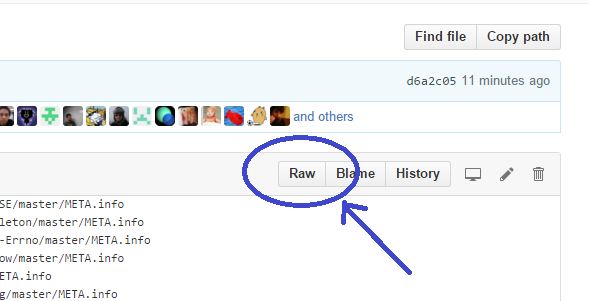
Grab a link to the raw view of your META file. You can get to it by clicking the "Raw" button in the top, right corner of the file view on GitHub. It'll be a link akin to https://raw.githubusercontent.com/zoffixznet/perl6-IO-MiddleMan/master/META6.json

arrow.png

Go to the META.list file in perl6/ecosystem repo. You can edit that file directly (and submit a PR) by clicking the pencil icon in top, right corner on GitHub, or fork the repo and submit a PR using other means. In that file, on a separate line, add the link to your dist's META file.

After 1–2 hours after your PR is merged, the build cron job will list your module on modules.perl6.org. If it's still missing, check the build log for any errors; you can just search the page for term [error]

Keep in mind that panda doesn't fetch a new ecosystem list on each run, so if you want to install your freshly-added module, you need to run panda update first.

Add to Ecosystem (The Future)

Perl 5's model goes something like this: you upload stuff on PAUSE, it gets propagated to all sorts of mirrors (CPAN), you can search for things using MetaCPAN, and you install those things from one of the mirrors using a CPAN client, like cpanm. Wouldn't it be sweet for Perl 6 folks to get in on that action?

Well, you can! Unless you're reading this after the world was destroyed by a nuclear catastrophe, you can log in onto PAUSE right this second and upload a Perl 6 dist.

Providing your dist looks proper and contains META6.json file, all you need to do is choose Perl6 as the Target Directory on the dist upload page.

Now, just because you uploaded a Perl 6 dist doesn't mean it'll show up on MetaCPAN; it's the whole point of specifying the Perl6 target dir. There will be a Perl 6 version of the MetaCPAN hosted elsewhere. That MetaCPAN will be a modified version of the Perl 5's MetaCPAN under the hood.

Currently, that work is being done by brave pioneers like jdv79, ranguard, and anyone else who I left out due to my ignorance. Having more Volunteers would certainly be helpful, and if you seek fame and recognition, you should stop by #perl6-toolchain channel on irc.Freenode.net and offer a helping hand.

Hopefully, you found this article helpful and I await your contributions to the Perl 6 Ecosystem!

Perl 6: Shortcuts (Part 1)

Programming is a task where laziness is a virtue. We write modules to avoid repeatedly writing subroutines. We write subroutines to avoid repeatedly writing loops. We write loops to avoid repeatedly writing code... And there's another level of laziness: we use language shortcuts to avoid writing too much code.

Shortcuts are a controversial subject. Some say they make code faster to write and easier to read. Some say they make it harder to understand for people unfamiliar with those shortcuts. So this article is merely telling you about shortcuts and it's up to you to decide whether to use them or to avoid them. Let's begin, shall we!

Public Getter/Setter for Class Attributes

The concept of a "getter" and "setter" is common in many languages: you have a "thing" in your class and you write a method to set or get the value of that thing. In verbose Perl 6, such a set up might look something like this:

class Foo {
    has $!attr = 42;
    method attr is rw { $!attr }
}

my  $obj = Foo.new;
say $obj.attr;
    $obj.attr = 72;
say $obj.attr;

# OUTPUT>>:
# 42
# 72

That looks pretty concise as it is, but public attributes are common enough to make writing even this bit of code annoying. Which is why the $. twigil exists. Using it alone creates a "getter"; if you want a "setter" as well, use the is rw trait:

class Foo { has $.attr is rw = 42; }
my  $obj = Foo.new;
say $obj.attr;
    $obj.attr = 72;
say $obj.attr;

# OUTPUT>>:
# 42
# 72

We changed the $! twigil on our attribute to $. twigil and it took care of creating a public method for us. Moving on!

Omiting Parentheses on method calls

It's not uncommon to see code like this, where you have a whole ton of parentheses at the end. Be sure they all match up!!

$foo.log( $obj.nukanate( $foo.grep(*.bar).map(*.ber) ) );

For those who are reminded of a popular webcomic, Perl 6 has an alternative:

$foo.log: $obj.nukanate: $foo.grep(*.bar).map: *.ber;

If a method is last in the method call chain, you can omit its parentheses and use a colon : instead. Except for .grep, all of our calls above are "last in the chain," so that was quite a bit of parentheses we got rid of. Sometimes I also like to start the thing following the colon on a new line.

And just a note: you can always omit parenthesis on method calls if you're not supplying any arguments; no semicolons are needed either.

Commaless Named Arguments

If you're calling a method or a sub and are providing only named arguments, you can omit commas between the arguments. Sometimes, I like to stack each argument on a new line as well:

class Foo {
    method baz (:$foo, :$bar, :$ber) { say "[$foo, $bar, $ber]" }
}
    sub    baz (:$foo, :$bar, :$ber) { say "[$foo, $bar, $ber]" }

Foo.baz:
    :foo(42)
    :bar(72)
    :ber(100);

baz :foo(42) :bar(72) :ber(100);

# OUTPUT>>:
# [42, 72, 100]
# [42, 72, 100]

Again, this works when you are providing only named arguments. There are many, many other places where you'd be using the same form to provide arguments or Pairs, but you can't omit commas there.

Integers in Named Arguments/Pairs

Looking at the last code example, it's a bit parentheses-heavy. So there's another shortcut: if the argument or Pair takes a positive integer as a value, simply write it between the colon and the name of the key:

say DateTime.new: :2016year :2month :1day :16hour :32minute;

# OUTPUT>>:
# 2016-02-01T16:32:00Z

This is one of those things that look jarring when you first learn it, but you get used to it quite fast. It also reads a lot like English:

my  %ingredients = :4eggs, :2sticks-of-butter, :4cups-of-sugar;
say %ingredients;

# OUTPUT>>:
# cups-of-sugar => 4, eggs => 4, sticks-of-butter => 2

Booleans in Named Arguments/Pairs

If we have a shortcut for Ints in named arguments, it'd be daft not to have one for Booleans too. And there is one: use the name of the key by itself to indicate True; insert an exclamation mark between the key and the colon to indicate False:

sub foo (:$bar, :$ber) { say "$bar, $ber" }
foo :!bar :ber;

my  %hash = :!bar, :ber;
say %hash;

# OUTPUT>>:
# False, True
# bar => False, ber => True

Note: this applies to adverbs as well!

Lists in Named Arguments/Pairs

If you're supplying a quote-word construct to a named argument/pair that expects something listy, you can omit parentheses; just don't use any spaces between the key and the the quote-words:

sub foo (:@args) { say @args }
foo :args<foo bar ber>;

my  %hash = :ingredients<milk eggs butter>;
say %hash;

# OUTPUT>>:
# (foo bar ber)
# ingredients => (milk eggs butter)

Pass-through of variables to Named Arguments/Pairs;

Did you think we were done with the named args? There's one more cool shortcut: s'pose you have a variable and it has the same name as the named argument... just pass it in by using the variable itself, instead of the key, after the colon:

sub hashify (:$bar, :@ber) {
    my %hash = :$bar, :@ber;
    say %hash;
}

my ( $bar, @ber ) = 42, (1..3);
hashify :$bar :@ber;

# OUTPUT>>:
# bar => 42, ber => [1..3]

Notice neither in the sub call nor in our hash creation are we duplicating the names of keys. They're derived from variable names.

Subs as method calls

If you have a sub you're dying to call as a method on something, just prefix it with an ampersand. The invocant will be the first positional argument, with all the other args passed as usual.

sub be-wise ($self, $who = 'Anonymous') { "Know your $self, $who!" }

'ABC'.&be-wise.say;
'ABC'.&be-wise('Zoffix').say;

# OUTPUT>>:
# Know your ABC, Anonymous!
# Know your ABC, Zoffix!

This is essentially a less-ugly way to call a .map in certain instances, but using a sub as a sub was meant to be used would likely win most of the time, in terms of readability.

sub be-wise ($self, $who = 'Anonymous') { "Know your $self, $who!" }

'ABC'.map({be-wise $_, 'Zoffix'})».say;
say be-wise 'ABC', 'Zoffix';

# OUTPUT>>:
# Know your ABC, Zoffix!

For the sake of completeness, and not anything overly practical, know that you can also inline the call and even use a pointy block to set a signature!

'ABC'.&('Know your ' ~ *).say;
'ABC'.&( -> $self, $who = 'Anonymous' {"Know your $self, $who!"} )('Zoffix')
    .say;

# OUTPUT>>:
# Know your ABC
# Know your ABC, Zoffix!

Hyper Method Calls

Since we're on the topic of shortcuts for .map, keep the » hyper operator in mind. Using it before the dot of a method call indicates you want to call the following method on each element of the invocant, instead of the invocant itself. As with all fancy-pants operators, Perl 6 provides "Texas" variant for this operator as well, >>

(1, 2, 3)».is-prime.say;
(1, 2, 3)>>.is-prime.say;

# OUTPUT>>:
# (False True True)
# (False True True)

This one has a bonus too: while currently not yet implemented in Rakudo, the spec permits this operator to perform concurrently, so you can eventually see it perform the faster the more cores your box has!

Summary

  • Use $. twigil to declare public attributes
  • Use : instead of parentheses for giving arguments to a method call that is last in the chain
  • Method/sub calls with only named arguments do not need commas
  • Pass Int values by writing them between the key and the colon
  • Use key by itself to specify a True boolean value
  • Use key by itself, with ! between it and colon to specify a False boolean value
  • When value is a quote-word construct, write it right after the key, without any parentheses
  • When a variable has the same name as the key, use it directly as the key (including the sigil), without specifying any values
  • Prefix the name of a sub with & when calling it as a method.
  • Use » operator to call a method on each item in the list.

Conclusion

This isn't the full list of Perl 6 shortcuts and I'm sure I'm yet to learn some of them myself. This is why I named the article 'Part 1'. Do you know any cool and useful shortcuts you'd like to be included in subsequent parts? Post them in the comments!

Perl 6 .rotor: The King of List Manipulation

Rotor. The word makes a mechanic think about brakes, an electrical engineer about motors, and a fan of Red Letter Media YouTube channel about poorly executed films. But to a Perl 6 programmer, .rotor is a powerful tool for list operations.

Break up into chunks

At its simplest, .rotor takes an integer and breaks up a list into sublists with that many elements:

say <a b c  d e f  g h>.rotor: 3
>>>OUTPUT: ((a b c) (d e f))

We have a list of 8 elements, we called .rotor on it with argument 3 and we received two Lists, with 3 elements each. The last two elements of the original list we not included, because they don't make up a complete, 3-element list. That can be rectified, however, using the :partial named argument set to True:

say <a b c  d e f  g h>.rotor: 3, :partial
>>>OUTPUT: ((a b c) (d e f) (g h))
say <a b c  d e f  g h>.rotor: 3, :partial(True)
>>>OUTPUT: ((a b c) (d e f) (g h))
say <a b c  d e f  g h>.rotor: 3, :partial(False)
>>>OUTPUT: ((a b c) (d e f))

Here's what we've learned so far, used as a crude means to fit a chunk of text into 10-column width:

"foobarberboorboozebazmeow".comb.rotor(10, :partial)».join».say
>>>OUTPUT:
    foobarberb
    oorboozeba
    zmeow

We broke up the string into individual letters with .comb method, then we .rotor them into 10-element lists, specifying that :partial lists are fine too, and lastly we use a pair of hyper method calls to .join and .say each of those sublists.

Mind The Gap

Say, you're receiving input: you get a word, its French translation, and its Spanish translation, and so on for a whole bunch of words. You want to output only a particular language, so we need to somehow skip over some items in our list. .rotor to the rescue!

Specifying a Pair of integers as the argument makes .rotor break up the list into $key elements, with $value gap in between. Easier to see in the example:

say ^10 .rotor: 3 => 1, :partial
>>>OUTPUT: ((0 1 2) (4 5 6) (8 9))
say ^10 .rotor: 2 => 2, :partial
>>>OUTPUT: ((0 1) (4 5) (8 9))

On the first line, we have a range of integers from 0 to 9, we're asking .rotor to break that up into lists of 3 elements (including partial lists) and use a gap of 1. And indeed, you can see the output is missing number 3 as well as 7. Those are the gaps we skipped. In the second example, we've increased the gap to 2, and broke up the list into 2-element sublists: the 2, 3, 6, and 7 are the numbers that fell into gaps and were not included. Back to our exquisitely convoluted translations program:

enum <English French Spanish>;
say join " ", <Good Bon Buenos morning matin días>[French..*].rotor: 1 => 2;
>>>OUTPUT: Bon matin

We cheatsy-doodle with an enum and then use the [LANG..*] to toss the head of the list. The French in our example is enumerated into integer 1, which means [1..*] gets rid of the first element. Then, we use .rotor to make 1-element lists with a 2-element gap. This makes it skip over the words for languages we're not interested in.

Now, I'm sure some in the audence are currently throwing tomatoes at me and saying I'm going mental with my examples here... Let's look at something more real-worldly.

Overlaps

You have a list and you want to Do Things™ based on whether the next item is the same as the current one. Typically, this would involve a loop and a variable holding the index. You check the index+1, while also checking you've not reached the upper boundary of the list. Sounds tedious. Let's use .rotor instead!

We've already learned above that using a Pair we can introduce gaps, but what if we make the gap negative? It actually works!

say <a a b c c c d>.rotor: 2 => -1
>>>OUTPUT: ((a a) (a b) (b c) (c c) (c c) (c d))
say <a a b c c c d>.rotor(2 => -1).map: {$_[0] eq $_[1] ?? "same" !! "different"}
>>>OUTPUT: (same different different same same different)

On the first line, we're just printing the results from .rotor to see what they look like and on the second line, we're performing the actual comparison and acting accordingly. Looking at the first result: we get 2-element lists, where the first element is the element from the original list and the second element is the one that follows it. That is, were we to print just the first elements of our sublists, we'd receive our original list back, minus the last element. The second elements are all just a bonus!

All Out

A single Int or a Pair are not the only thing .rotor can accept. You can specify additional positional parameters that are Ints or Pairs to break up lists into sublists of different sizes, with different gaps between them.

Say, I have a custom daemon that creates logs about users that access it. The log is in plain text, each record follows the other. Records are multi-line and always look something like this (two records + separator shown):

IP: 198.0.1.22
Login: suser
Time: 1454017107
Resource: /report/accounting/x23gs
Input: x=42,y=32
Output: success
===================================================
IP: 198.0.1.23
Login: nanom
Time: 1454027106
Resource: /report/systems/boot
Input: mode=standard
Output: success

Each item contains a "header" with user information and resource they tried to access, as well as the "operation" they wanted to execute. In addition, each item is separated by a double-line. I would like to print the header and the executed operation, and I want Resource: to be present in both.

To parse this, we could use Grammars, but .rotor can do the trick too:

for 'report.txt'.IO.lines».indent(4).rotor( 4 => -1, 3 => 1 ) -> $head, $op {
    .say for "Header:",    |$head,
             "Operation:", |$op, '';
}

>>>OUTPUT:
    Header:
        IP: 198.0.1.22
        Login: suser
        Time: 1454017107
        Resource: /report/accounting/x23gs
    Operation:
        Resource: /report/accounting/x23gs
        Input: x=42,y=32
        Output: success

    Header:
        IP: 198.0.1.23
        Login: nanom
        Time: 1454027106
        Resource: /report/systems/boot
    Operation:
        Resource: /report/systems/boot
        Input: mode=standard
        Output: success

We fetch lines from file report.txt with 'report.txt'.IO.lines. To make output prettier, we indent each line with 4 spaces by calling .indent(4) on each item using the hyper operator (»). Now comes .rotor! We use it to break up lines into repeating chunks of 4 and 3 items: that's items for our header and our operation. After grabbing the 4-element chunk, we use a negative gap to backtrack and include Resource: line in our operation chunk as well. In the 3-element chunk, we use a positive gap, to skip over the separator line.

Afterwards, we use a for loop and give it two variables with -> $head, $op, so it loops over two items at a time. Inside the loop, we merely print each log item onto the screen. Since $head and $op are Lists, we use the pipe (|) character to slip them in.

Keep in mind, the pattern you supply to .rotor can be dynamically generated! Here we use a sine to generate it:

say ^92 .rotor(
    (0.2, 0.4 ... 3).map: (10 * *.sin).Int # pattern we supply to .rotor
).join: "\n"'
>>>OUTPUT:
    0
    1 2 3
    4 5 6 7 8
    9 10 11 12 13 14 15
    16 17 18 19 20 21 22 23
    24 25 26 27 28 29 30 31 32
    33 34 35 36 37 38 39 40 41
    42 43 44 45 46 47 48 49 50
    51 52 53 54 55 56 57 58 59
    60 61 62 63 64 65 66 67 68
    69 70 71 72 73 74 75 76
    77 78 79 80 81 82
    83 84 85 86 87
    88 89 90
    91

So whether you're an electrician, mechanic, or anyone else, I hope you'll find .rotor a useful multipurpose tool.

Update 1:

It's been pointed out to me that

"foobarberboorboozebazmeow".comb.rotor(10, :partial)».join».say

Is better written as

"foobarberboorboozebazmeow".comb(10)».say

100+ Modules for Adoption! (Bit Rot Thursday)


EDIT: Just a note for PAUSE admins, as some emailed me, any module listed on this post can be given away to anyone who wishes to take it, without any need to ask me first. I do not wish to retain a co-maint either, so please just go ahead and transfer the ownership :) Thanks!


Today's Thursday, and if you regularly read blogs.perl.org, you know today is the first day of my plan to combat bit rot.

Happy Bit Rot Thursday, everyone!

The first step I'm undertaking is reducing the number of projects under my wing by means of deleting them entirely or putting them up for adoption. In total, there are about 107 modules I made adoptable, although some of them are a bundle deal.

Adoption

Here are adaptable modules that I moved to the ADOPTME user. If interested, you should be able to claim any of them by emailing PAUSE admins at modules at perl dot org and asking them to transfer permissions to you. See neilb's blog post for more details.

I do realize a lot of them are trash, even if some were useful or amusing back when I first started coding Perl. I don't think I'd cry if I find out some of them get deleted by adopters.

And the modules are:

Deletion

Also, some modules went under the axe and have been marked for deletion:

  • Acme::Excuse — a useless modules that intercepted __DIE__ signal and showed a random message from http://www.programmerexcuses.com/
  • Acme::XAppender — the "x appender framework" that resulted from a joke in a #perl IRC channel
  • App::IRCBot::NewYears — a bot for IRC New Years parties. While I still plan to make my bot attend such parties, it'll now be the Perl 6 version
  • Package::Localize — a half-working module that lets you use multiple different copies of packages with package-scoped variables. In the end, it didn't work out for my purpose.

In Perl 6 land, I removed these:

More

What I've done today is not all the modules I wish to delete or give away. Those I've left for the next time need evaluation to see whether anything uses them. Also, as I become more and more interested in programming Perl 6, rather than Perl 5, there may come a day, when I give all of my Perl 5 goodies up. Only time will tell.

Bit Rot Thursday

Part 1: There is a Problem

I don't think I'd have to look for long for someone who'd agree that writing new code is much more fun that fixing bugs in old one. A cool new idea gets written up, while older code is still lacking tests. A new module gets shipped, while there's still that API improvement proposal from 6 months ago in the other. And while you're drafting a design document for the Next Awesome Thing, the rest of your code is being slowly consumed by bit rot.

Having written 250–300 Perl 5 modules and now 32 Perl 6 modules and other ideas, I'm more than aware of what it feels like to be leaving a decaying pile of code in your wake. The problems I notice are these:

  • Unfixed bugs
  • Lack of compresensive tests
  • Lack of documentation
  • Bad documentation (too wordy; incorrect; partial)
  • Unimplemented new features, even if the proposal for them was approved
  • Partial implementation (an FTP client that can only download, for example)

I can think of several reasons why it might be hard to find motivation to take care of bit rot, all of which are perfectly valid:

  • You're "too busy." You spent 8 hours at work, hacking on arcane code, and when you come home you want to relax and play Warframe and not spend 3 more hours hacking on arcane code. Your next Killer App is more important than this module you wrote 5 years ago because you were bored. Your interests changed: you no longer do web development with Perl 5 and instead are hacking on Artificial Intelligence software with Perl 6. And maybe you just have too many projects in the first place.
  • You don't know what needs to be done. Sure, CPAN Testers send you emails when something's broken, but it's easy to put off until the mythical "tomorrow." Your documentation is missing and users want new features, but you forgot that was brought up a few months ago. And what about Issues that go stale without any plan of action?
  • It's too hard. You set out to do a task and you implemented A, B, and C. Now, someone came up to you and said your thing is lacking X. Problem is, you don't have adequate knowledge and experience to implement X. And learning it requires both time and interest. Another example: users are reporting a nasty bug, but you can rarely reproduce it, and when you do, you still have no idea why it occurs.

And while entropy is a tough foe to conquer, I think at least acknowledging there is a problem is a good stepping stone to finding a workable solution.

Part 2: There is a Solution

I toyed with the idea of dedicating a special day to deal with just these sort of problems for a while. Today, I decided to commit myself to it, and I invite anyone willing, to do so themselves and address bit rot in their own software. The plan is simple:

Every Thursday is a "Bit Rot Thursday." You find some time to address bit rot and just do it. Why Thursday? I figure Friday, Saturday, and Sunday are all about relaxing; Monday, Tuesday, Wednesday are a beginning of the week people tend to "hate"; and Thursday is in the sweet spot: do work just before the weekend and feel good about yourself when the weekend comes. Since monotony is boring, you get one Thursday every month that you can "legally" skip and do nothing. Keep in mind, Bit Rot Thursday is not only about dealing with current bit rot, but doing preventative care as well. Let's see how we can accomplish those goals:

Toss It in the Bin

Before you rush off to fix a bug in your lolcat_phrase_generator_5000.pl, ask yourself: is this script or module still needed? You may feel attached to this "web framework" you wrote 8 years ago, but nobody—even you any more—uses it, so implementing HTTP/2 in it is likely a waste of time.

The modules you delete off CPAN will still be available on BackPAN, so don't be shy. You only have this much time in a day, and it's necessary to regularly throw clutter out. This is quite equivalent to accumulating useless trinkets in your garage, in case you'll need them some day. Just toss it in the bin.

Give It Away

If you don't think your software deserves such a harsh fate as being wiped from the face of Earth, consider putting it up for adoption. You can use blogs, social media, and IRC to advertise that you're looking for a new maintainer who'd be interested in fixing issues. On CPAN, you can transfer the module to user ADOPTME, to enlist your module as adoptable by interested parties. Perl 6 has its own version of the idea: place the META file into the SHELTER and then remove your module from the Ecosystem.

Delegate

Instead of parting with your goods completely, delegate. The Mojolicious project is a good example of how to seek out volunteers: Issue labels future and help wanted are used to indicate work to be done and social media is used to advertise and find volunteers willing to do the required work.

Did someone submit a report for a bug? Ask the submitter whether they'd be able to fix it. Did someone request a new feature? Suggest you'd accept a patch. Include details on what you think might be causing the bug and outline the details of how a feature can be implemented. Even if that person is unable to help, you'll have a plan of action already in writing.

Find and Review Reports

Go through RT tickets, GitHub Issues, your notes and reminders. When you log in to RT, the Bugs in My Distributions panel is third on the left. On GitHub, click the Issues link in top, center of the page and then change author: to user: in the search box. This will show you all open Issues in your code. You can use user: more than once, if you wish to also include issues from GitHub organizations you belong to. As an example, here's a search query that shows both Issues in my code and in Perl 6 organization: is:open is:issue user:zoffixznet user:perl6

Get a MetaCPAN account and try out the Dashboard MetaCPAN Lab to see the number of open issues and test failures in all your modules: https://metacpan.org/lab/dashboard.

Categorize the issues using tags and labels. Merge duplicates. Close anything that's irrelevant, can't or won't be fixed. If the conversation died out, just close the ticket with a request to reopen it if anyone has the same issue. There's no reason for tickets to be left open for years.

Evaluate Unreported Things

Go to CPAN Testers and browse by Author to your Author page (middle of page, third section). You can then use the Preferences panel on the left to generate a link to show failures only. Bookmark it. Examine any failures and see if you can fix them. When you upload new modules, if their tests are failing, you should be getting an email from CPAN Testers informing you there is a problem. If you're not getting those, check your settings and your spam folder.

Use Devel::Cover to evaluate how well your tests cover your code. If you use Dist::Zilla, there's Dist::Zilla::App::Command::cover that adds cover command to dzil.

To ensure your documentation is complete, add Pod::Coverage to your author tests (that is, place it in xt/ directory rather than t/ so it doesn't run during user's installation). Completeness is one thing, but quality is another. Examine your extant documentation. Try to reduce the amount of words in it, while still retaining information. Use examples! A good, clear example can shave off a whole paragraph of dense technical text. There's nothing wrong with actively inquiring your users about the quality of the documentation. Do people frequently ask a particular question? Creating a FAQ is one way to go, but it's often an indicator your actual documentation can be improved in that area.

In Perl 6, Test::META lets you find problems in your META file and Pod::Coverage distribution includes Test::Coverage module to check completeness of your docs.

Prevent Bit Rot

So far, our Bit Rot Thursday sounds mundane and boring, dealing with tedious problems. However, you can actively work against those problems appearing in the first place.

When you start a new project, do you write down a clear definition of the problem you're attempting to solve? A sure-fire way to waste time is to spend several days adding a ton of configuration options and features that you don't have any use for, simply because you never defined a concrete problem to solve. Worse: you continue to support and maintain all those features for years to come!

When you lay down the first line of code, do you have some form of a "spec" that details the bits and pieces of your project and how they're supposed to interact with each other? I'll leave it to other sources to argue for cost savings of such an approach, but I can tell you that when you realize JSON and not PDF is better suited for the output of your program, rewriting two paragraphs of text in the spec is much simpler than rewriting several subroutines, methods, and tests.

A design spec also makes it much easier to create both tests and user documentation for your project. The test suite is the spec translated into a computer language. The docs are the spec with internal details removed and code examples added.

Speaking of tests, it's often handy to write them first, before your actual module or script. The tests define the problem you're attempting to solve. Failing tests indicate what bits you haven't solved yet. You can also very easily track your progress, as you can see how many tests still fail. Since this approach generates a lot of output on each test run, you may find Test::Most's DIE_ON_FAIL useful. You can include it in code or use DIE_ON_FAIL=1 environmental variable and this will cause the test suite to stop at the first failure.

So spend your Bit Rot Thursday making templates for specs and tests and outlining plans for what sort of documents need to be prepared for the types of projects you create. It's also a good idea to draft up guidelines for contributors, to make it clearer what sort of contributions you're looking for. You'll spend less time explaining your standards in pull requests!

Growing Yourself

Who is more likely to produce a wall that'll crumble in a year: an experienced bricklayer or a novice? Writing code certainly gives you practice, but you need theory too, as well as to keep yourself up to date with the world. You can write a million lines of code that uses CGI.pm and memorize every word in its documentation, but in 2016 you'll still be unemployable in the field of Web Development if that's all you can do. Technologies change. Standards change. Practices change. We should change too.

And so, it's possible to spend the Bit Rot Thursday away from the keyboard. On a train, plane, bus, or boat, with your phone or tablet, reading programming blogs and articles. At a bar with your fellow programmers, exchanging ideas. In a park, on a sunny day, with a programming book in your hand.

And as you get better, so will your code...

Perl 6 is written in... Perl 6

Today, I've done something strange.

No, there weren't drugs involved, I merely sent a patch for Rakudo for a bug I reported a few weeks back. But the patch is... interesting.

First, about the "bug." Newest JSON spec lets you have anything as the top level thing. I spotted a few modules in the Perl 6 ecosystem that still expected an object or an array only, and the vendor-specific (possibly to be made hidden in the future) to-json subroutine provided by core Rakudo behaved the same as well.

One of the modules got fixed right away and today, seeing as there were no takers, I went in to fix the bug in Rakudo myself. Since I'm a lazy bum, I merely went in to that one fixed module and just copied the fix over!

But wait a second... ain't the Perl 6 module written in Perl 6? How did I manage to "just copy it over"? What sorcery is this! Surely you lie, good sir!

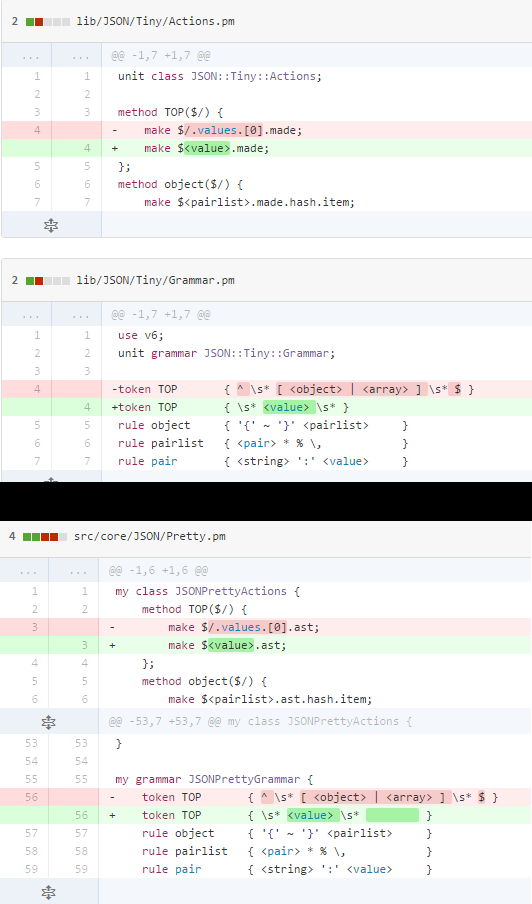
Here are the Rakudo and the module patches one above the other. Try to figure out which one is for Rakudo:

source2.png

Give up yet? The code above the black bar is the patch made in JSON::Tiny module and the code below it is the patch I made for Rakudo.

As surprising and amazing as it is, most of Perl 6 is actually written in Perl 6! The NQP (Not Quite Perl) provides the bricks and the mortar, but when it comes to the drywall, paint, and floorboards, you're full in the Perl 6 territory.

So what does this all mean?

I'm not a genius programmer and I'm quite new to Perl 6 too, but I was able to send in a patch for the Perl 6 compiler that fixes something. And it's not even the first time I sent some Perl 6 code to improve Rakudo. Each one of the actual users of Perl 6 can fix bugs, add features, and do optimizations. For the most part, there's no need to learn some new arcane thing to hack on the innards of the compiler.

Imagine if to fix your car or to make it more fuel efficient, all you had to do was learn how to drive; if to rewire your house, all you had to do is learn how to turn on TV or a toaster; if to become a chef, all you had to do was enjoy a savory steak once in a while. And not only the users of Perl 6 are the potential guts hackers, they also have direct interest in making the compiler better.

So to the speculations on the potential Perl 6 Killer App, I'll add that one of the Perl 6's killer apps is Perl 6 itself. And for those wishing to add "programming a compiler" onto their résumés, simply clone the Rakudo repo and go to town on it... there are plenty of bugs to squish.

  1 2 3 4 5 6 7  

About Zoffix Znet

user-pic I blog about Perl.