How-To Archives

GitHub and the Perl License

When we publish our Perl module repository on GitHub, we might notice something peculiar in the "About" section of our repository: GitHub doesn't recognize the Perl 5 license. This can be a bit confusing, especially when we've explicitly stated the licensing in our LICENSE file.

Without properly defined license, GitHub ranks the quality of a repository lower. This is also unfortunate because it limits the "searchability" of our repository. GitHub cannot index it according to the license and users cannot search by license. This is today more important than ever before as many enterprises rule out open source projects purely on the grounds that their license is poorly managed.

The Problem: Two Licenses in One File

The standard Perl 5 license, as used by many modules, is a dual license: Artistic License (2.0) and GNU General Public License (GPL) version 1 or later. Often, this is included in a single LICENSE file in the repository root.

GitHub's license detection mechanism, powered by Licensee, is designed to identify a single, clear license. When it encounters a file with two distinct licenses concatenated, it fails to make a definitive identification.

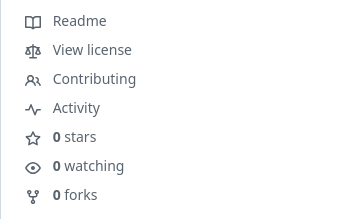
Here's an example of a repository where GitHub doesn't recognize the license. Notice the missing license badge in the "About" section:

github-licenses-not-visible.png

Also the "quick select" banner above Readme file does not acknowledge which license there is. github-licenses-not-visible-bottom-bar.png

The Solution: Separate License Files

The simplest and most effective solution is to provide each license in its own dedicated file. This allows Licensee to easily identify and display both licenses. This is perfectly valid because the Perl 5 license explicitly allows for distribution under either the Artistic License or the GPL. Providing both licenses separately simply makes it clearer which licenses apply and how they are presented.

(The other reason for having multiple licenses is situation where different parts of the repository are under different licenses. But this is not our problem here.)

For example, instead of a single LICENSE file containing both, we would have:

  • LICENSE-Artistic-2.0
  • LICENSE-GPL-3

Let's look at an example from my own env-assert repository. In this repository, I've separated the licenses into LICENSE-Artistic-2.0 and LICENSE-GPL-3.

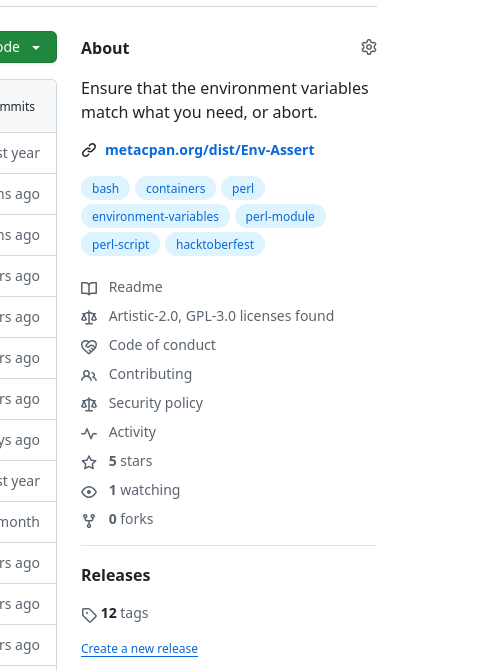
And here's how GitHub's "About" section looks for env-assert, clearly recognizing both licenses:

github-licenses-visible.png

As we can see, GitHub now correctly identifies "Artistic-2.0" and "GPL-3.0" as the licenses for the project.

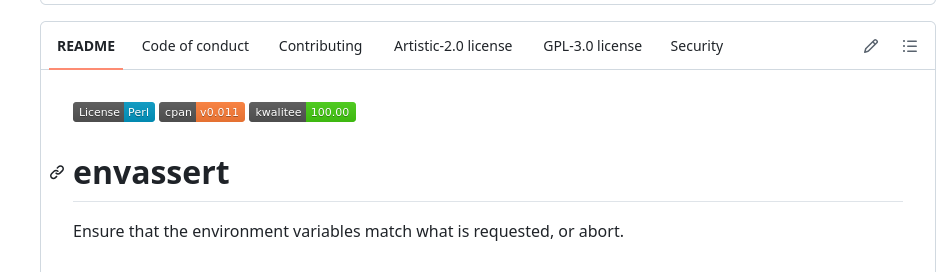
Same is also visible in the "quick select" bar:

github-licenses-visible-bottom-bar.png

Automating with Software::Policies and Dist::Zilla::Plugin::Software::Policies

Manually creating and maintaining these separate license files for every module can be tedious. Fortunately, there is a way to automate this process if you are using Dist::Zilla for authoring.

Dist::Zilla::Plugin::Software::Policies

If we're using Dist::Zilla for our module authoring, Dist-Zilla-Plugin-Software-Policies can automatically check that we have the correct License files. It uses Dist::Zilla's internal variable licence to determine the correct license files.

The Dist::Zilla plugin uses Software-Policies as a backend to do the heavy lifting.

Software::Policies

Software::Policies is a module that provides a framework for defining and enforcing software policies, including licensing. It comes with a pre-defined policy for Perl 5's double license. It can also generate other policy files, such as CONTRIBUTING.md, CODE_OF_CONDUCT.md, and SECURITY.md.

By using Software::Policies, we can programmatically check for the presence and content of our license files.

This approach not only solves the GitHub license detection problem but also helps us maintain consistent and correct licensing across all our Perl modules, integrating it directly into our build workflow.

By configuring this plugin in our dist.ini, we can ensure that our distribution always includes the correct and properly formatted license files, making GitHub (and other license scanners) happy.

Here's a simplified example of how we might configure it in our dist.ini:

[Software::Policies / License]
policy_attribute = perl_5_double_license = true

[Test::Software::Policies]
include_policy = License

This configuration tells Dist::Zilla plugin Test::Software::Policies to apply the Perl licensing policy, which typically means Artistic License 2.0 and GPL. When we build our distribution with Dist::Zilla, the plugin will create a test file checks for the existence and content of the LICENSE-Artistic-2.0 and LICENSE-GPL-3 files. During testing phase, when running dzil test or dzil release, the test files will be run and if the license files are missing or incorrect, the tests will fail.

To generate the files, we can run the command dzil policies License or just dzil policies. This will create the files according to config in dist.ini, the [Software::Policies / License] part of dist.ini.

We cannot create the files automatically during build because then they will only be included in the release, not in the repository. It is precisely in the repository that we need them for GitHub's sake. So the process to create or update the license files has to have this small manual stage.

plenv-libdirs

A plenv plugin to add additional include directories to Perl.

This plugin sets the contents of file .perl-libdirs. It hooks into plenv-exec command and every time you run perl or any other command under plenv, plenv-libdirs uses the .perl-libdirs files to set the PERL5LIB environment variable.

plenv-libdirs makes use of .perl-libdirs files in the current working directory and every directory between it and root. Environment variable PERL5LIB has a list of paths separated (like in PATH) by a colon on Unixish platforms and by a semicolon on Windows (the proper path separator being given by the command perl -V:path_sep). When plenv-libdirs collects the paths from .perl-libdirs files, the order of the paths follows the order of the directories. The longer the path to .perl-libdirs file, the higher precedence in PERL5LIB.

Like environment variable PATH, Perl uses the paths in PERL5LIB in the order they appear. Likewise, the search paths in perl-libdirs files appear in the same order. Example: three projects in dir root: project-a has a dependency on utils and its test files have a dependency on testing-utils. Together, when working directory in /root/project-a, these would result in: PERL5LIB=/root/testing-utils/lib:/root/utils/lib

root: projects
|- .perl-libdirs: **/root/utils/lib**
|- project-a
|  |- .perl-libdirs: **/root/testing-utils/lib**
|  |- lib
|  |- t
|
|- utils
|  |- lib
|
|- testing-utils
   |- lib

Usage

$ plenv libdirs ../other-project
$ plenv libdirs
../other-project/lib
$ plenv libdirs --add /tmp/second-project
$ plenv libdirs
../other-project/lib:/tmp/second-project
$ plenv libdirs --rm ../other-project
$ plenv libdirs
/tmp/second-project
$ perl -M5.020 -Mstrict -W -e 'say $INC[0];'
/tmp/second-project
$ plenv libdirs --unset
$ plenv libdirs

GitHub

Download from GitHub: https://github.com/mikkoi/plenv-libdirs/

Assert Your Environment

Env::Assert

In the category of "scratching my itch".

I was doing some data pipelining and dockerising my creation. And - as always - when testing and devving I forgot to set the right environment variables. And when container image gets passed around, the information about the required env settings will certainly get lost.

Here is something of a solution to that:

How to ensure you have the environment variables and values you need?

Here is a common sight:

$ PLAEC='Stockholm'
$ if [[ "$PLACE" == '' ]]; then echo "Normal OK"; fi
OK

... And the program fails with no errors!

Not quite what we want!

Another example, from a docker container image I created lately:

perl -Ilib bin/repos-gh-yaml.pl --verbose         \
    | perl -Ilib bin/repos-yaml-csv.pl --verbose  \
    | az storage blob upload --data @-            \
        --content-type 'text/csv'                 \
        --content-encoding 'UTF-8'                \
        --content-language 'en_US'                \
        --name "$blob_name"                       \
        --container "$CONTAINER_NAME"             \
        --account-name "$AZURE_STORAGE_ACCOUNT"   \
        --sas-token "$AZURE_STORAGE_SAS_TOKEN"

If the environment variables are wrongly set, or entirely unset, it won't become known until after the run has started. And it could take hours before it reaches that point.

What we need is a way to find out if the environment variables are what we assume them to be. This needs to be done in an easy way and right at the beginning of the run.

Environment Description to the Rescue

Package Env::Assert and the executable envassert that comes with it do just this.

envassert is a CLI command to assert that your environment variables match your environment description.

environment description is a way to describe which environment variables are required by your program.

environment description is written in a file. Default file name is .envdesc.

If you are in the habbit of using .env files anyway, .envdesc complements it. Commit your .envdesc file into your repository and it will act as a template for user to create his/her .env file which should not be committed into Git anyway.

.envdesc actually looks a lot like a .env file, except instead of defining variables and their content, it defines regular expressions which control the variables' content. These regexps are Perl's extended regular expressions (m/<regexp>/msx).

Example:

CONTAINER_NAME=^[a-z0-9-]{1,}$
AZURE_STORAGE_ACCOUNT=^[a-z0-9]{1,}$
AZURE_STORAGE_SAS_TOKEN=^[?].*$
GITHUB_TOKEN=^[[:word:]]{1,}$

In normal circumstances, envassert only verifies the variables that you specifically describe. If you want more control over your environment, there is the meta command envassert (opts: exact=1) which will make envassert also assert that the environment doesn't contain any unknown variables.

## envassert (opts: exact=1)
USER=^username$
HOME=^/home/username$
PATH=^/usr/local/sbin:/usr/local/bin:/usr/sbin:/usr/bin:/sbin:/bin$

You can create an airtight environment description to verify environment variables in both test and production. Just run envassert as the first command during container execution.

This is what I do:

envassert --env-description /home/me/.envdesc \
    || ( echo 'Break execution ...' 1>&2 && exit 1 )

Installation

If I need to add envassert to a container image during build, there is a FatPacked executable ready for those cases when using CPAN is overkill.

I do this in Dockerfile!

RUN curl -LSs -o /usr/local/bin/envassert \
    https://raw.githubusercontent.com/mikkoi/env-assert/main/envassert.self-contained
RUN chmod +x /usr/local/bin/envassert

There is no extra dependencies outside Perl's standard distribution, so envassert is as lean as it can be.

Docker::Names::Random

If you are using Docker, you may have noticed that it creates random names for containers when you haven't provided any specific name. These names are a combination of an adjective and a proper name of an individual. The individuals are famous men and women picked from the history of scientific exploration and engineering.

This package allows you to use the same system in your own programs. You would get combinations like interesting_mendeleev, epic_engelbart, lucid_dhawan, recursing_cori, ecstatic_liskov and busy_ardinghelli.

The combination boring_wozniak is not allowed because Steve Wozniak is not boring. This same limitation exists in the original code.

SYNOPSIS

# As an object (if you create many, this is more efficient).
require Docker::Names::Random;

my $dnr = Docker::Names::Random->new();
my $random_name1 = $dnr->docker_name();

# As an imported function.
use Docker::Names::Random qw( docker_name );
# OR
use Docker::Names::Random qw( :all );

my $random_name2 = docker_name();

Git Repo in Shared Hosting #4 - Git Full Service Via SSH

In this fourth article we will now use SSH connection and SSH public keys to give access and also limit access to our repositories.

http://www.koivunalho.org/blogs/exercises-in-integration-and-delivery/private-repository-part-4.html

Git Repo in Shared Hosting #3 - Git::Hooks for a Secure and Clean Repo

http://www.koivunalho.org/blogs/exercises-in-integration-and-delivery/private-repository-part-3.html

About Mikko Koivunalho

user-pic Perl Programmer for fun and office. CPAN modules and command line tools.